Start here
A tour of the app
3 min read
Everything lives in the left sidebar. What you see depends on your permission profile and your plan: an item you are not allowed to use is simply not shown.
The top bar
| Item | What it does |
|---|---|
| ☰ (menu) | Collapses the sidebar to icons for more room (your choice is remembered). On a phone it opens the sidebar. |
| Breadcrumbs | Show where you are, for example Workspace / Workflows. |
| Environment switcher | Shows the active environment with its color dot. Pick another to switch; the page reloads in that environment. Hidden when you can reach only one environment. |
| Matt | Opens the builder assistant panel. See Matt. |
| Help | Sends a support request with optional screenshots. See Getting help. |
| 🔔 Notifications | Recent run failures and operational notices, with a link straight to the run. |
| 🌐 Language | English, Deutsch or Español. |
| ☾ Theme | Switches between light and dark. |
| Your avatar | My Profile, My requests (your support requests) and Log out. |
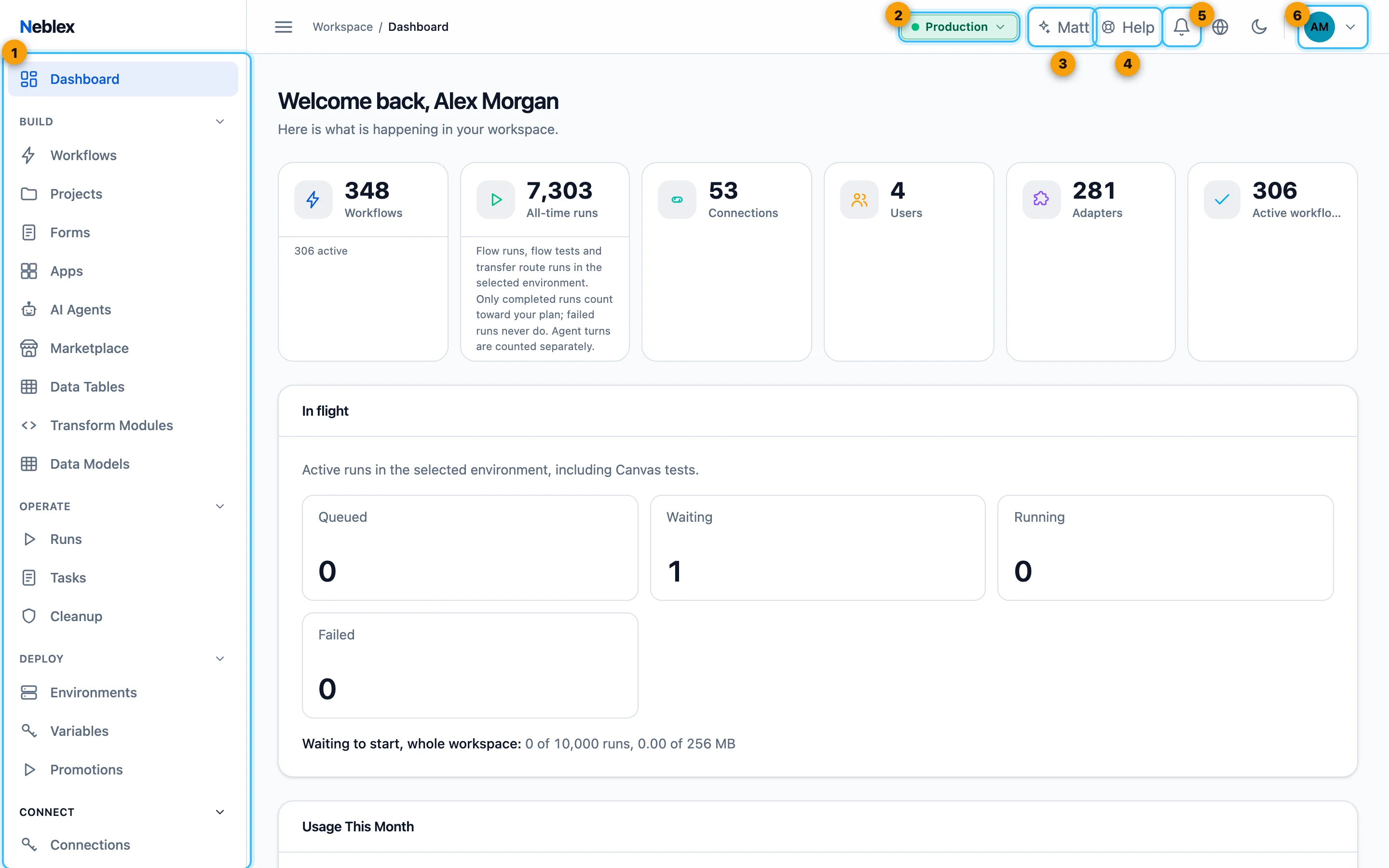
- The sidebar: Dashboard, then Build, Operate, Deploy, Connect and Govern, with Workspace at the bottom.
- The environment switcher: everything you see belongs to this environment.
- Matt, the builder assistant.
- Help: send a support request with screenshots.
- Recent failures and notices.
- My Profile, My requests and Log out.
The sidebar
Build starts expanded; the other groups open when you click them, and the group holding the page you are on always opens.
| Group | Menu item | What you do there |
|---|---|---|
| - | Dashboard | Workspace at a glance: counts, run health, runs in flight, items needing attention, recent flows and usage. More about Dashboard |
| Build | Workflows | Create, open, import, export and manage flows; start from templates. More about Workflows |
| Projects | Group flows and control who can see them. More about Projects | |
| Forms | Build hosted forms. More about Forms | |
| Apps | Build interfaces on your flows and tables. More about Apps | |
| AI Agents | Build assistants and chatbots, set up knowledge search, approve pending agent actions. More about AI Agents | |
| Marketplace | Install ready-made solutions or list your own. More about Marketplace | |
| Data Tables | Create and edit built-in tables. More about Data Tables | |
| Transform Modules | Reusable Rhai functions for Code steps. More about Transform Modules | |
| Data Models | Shared business shapes such as Customer or Order. More about Data Models | |
| Operate | Runs | Every run with its status, steps and errors; stop, retry, replay and export. More about Runs |
| Tasks | The worklist of human tasks. More about Tasks | |
| Cleanup | Find and remove unused building blocks. More about Cleanup | |
| Deploy | Environments | See environments and manage who can access each. More about Environments |
| Variables | Values that differ per environment, used as {{ env.NAME }}. More about Variables | |
| Promotions | Move flows, apps and agents between environments, with approval. More about Promotions | |
| Connect | Connections | Credentials for your systems, OAuth sign-in and testing. More about Connections |
| Custom Integrations | Add any API from its specification, by hand, or as a sandboxed module. More about Custom Integrations | |
| B2B Trading | Trading partners and EDI transactions. More about B2B Trading | |
| File Transfers | Scheduled, governed file movement between locations. More about File Transfers | |
| Govern | Users | Invite people and set their role. More about Users |
| Permission Profiles | Design exactly what each kind of user may do. More about Permission Profiles | |
| My Access | See your own permissions. More about My Access | |
| Audit log | Tamper-evident record of who did what. More about Audit log | |
| Security | Password policy, two-factor rules and who may reach public entry points. More about Security | |
| Single Sign-On | SAML or OpenID Connect sign-in and SCIM user provisioning. More about Single Sign-On | |
| Alerts | Email and webhook alerts through your own mail server. More about Alerts | |
| Telemetry export | Send run traces, metrics and logs to your own OpenTelemetry collector. More about Telemetry export | |
| Matt Builder Assistant | Choose the AI model Matt uses and cap its monthly budget. More about Matt Builder Assistant | |
| Git sync | Keep flow definitions in your own Git repository. More about Git sync | |
| On-Prem Workers | Enroll, download and control Workers and clusters. More about On-Prem Workers | |
| API Consumers | Keys for partner software, connected AI clients and your API reference. More about API Consumers | |
| Encryption Keys | Bring your own encryption key. More about Encryption Keys | |
| - | Workspace | Plan, usage and limits, data retention, company details, business hours and version. More about Workspace |
Don't see a menu item? It is either not part of your permission profile (check My Access) or not included in your plan (check the Features list on the Workspace page). Ask your workspace administrator.