Govern
API Consumers & managed API
Turn flows into an API for partners and your own software, with a key per caller, rate limits, monthly quotas and an OpenAPI description. Open Govern › API Consumers (plan feature).
Create an API consumer key
- Click New Consumer.
- Describe the caller. Name (for example Partner ERP), Rate (per minute) (0 = unlimited), Monthly quota, optional Expires and Allowed source IPs.
- Create Consumer and copy the key. It is shown once. Share it securely with the caller.
Default deny. A new key can call nothing until you grant it flows or projects.
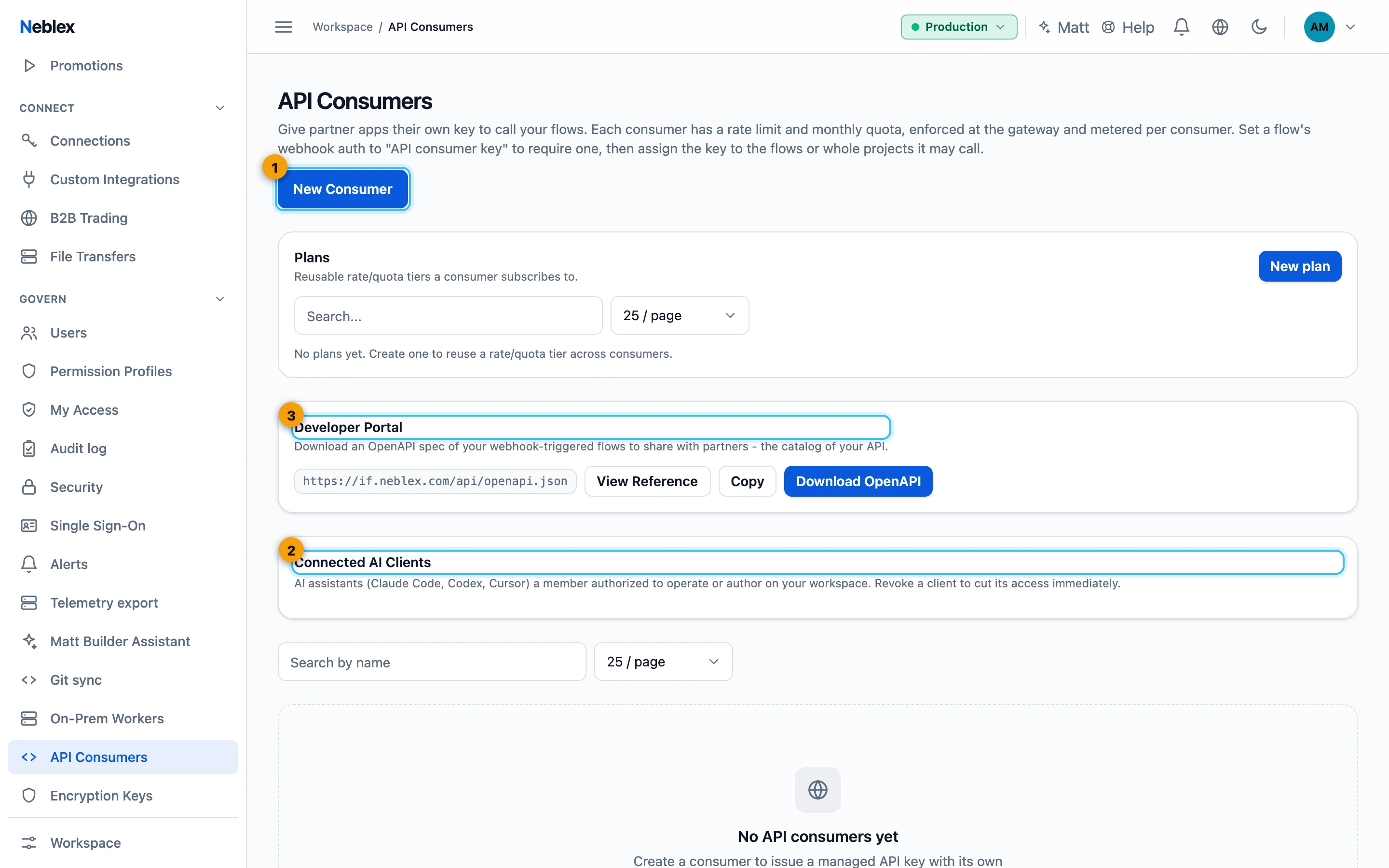
- Create a key for a calling system.
- AI clients you authorized over MCP.
- OpenAPI download and the live reference.
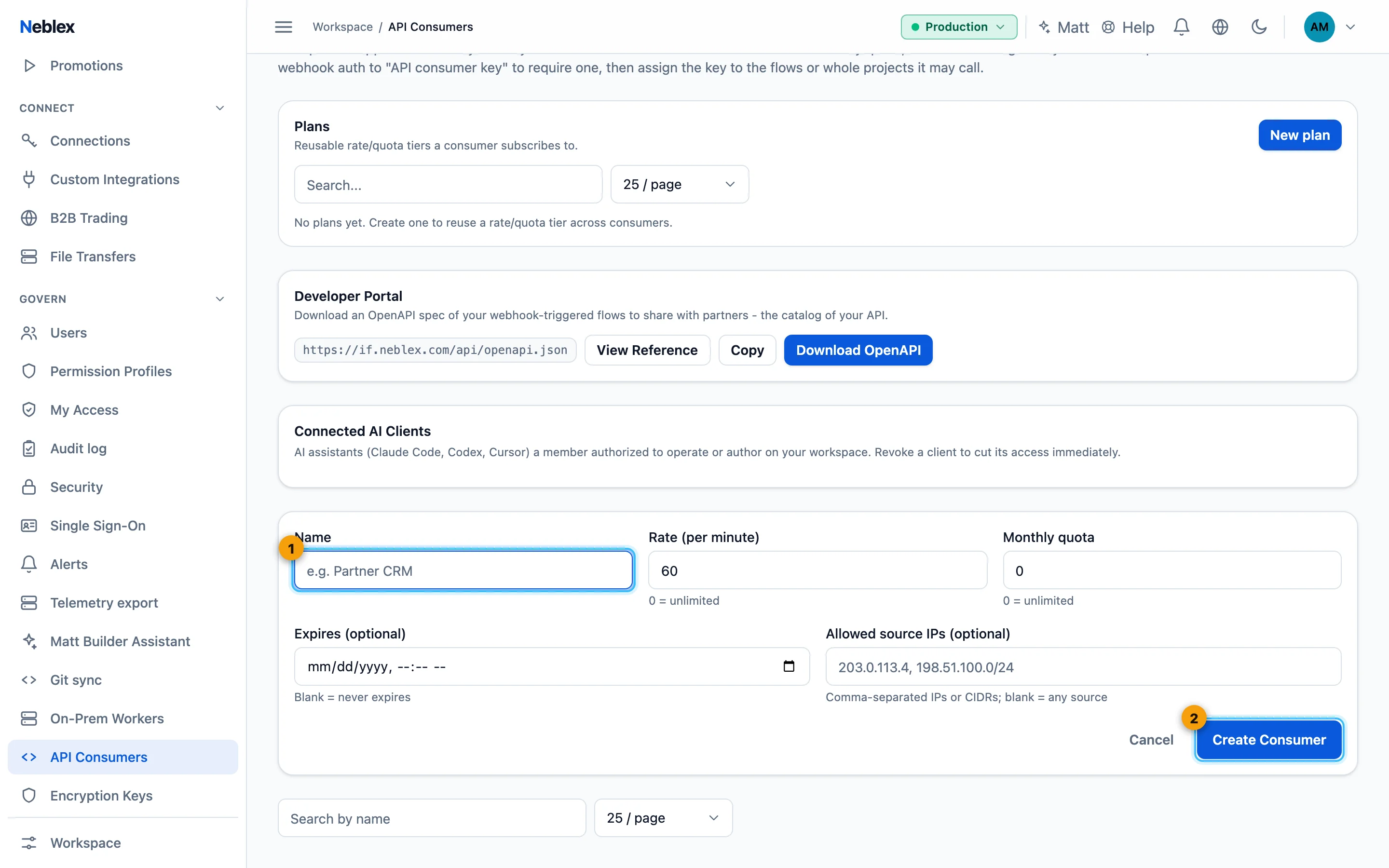
- Name, rate, quota, expiry and allowed IPs.
- The key is shown once.
Assign access to flows or projects
- Open Manage access on the consumer's row.
- Select flows or projects. Granting a project covers all its flows.
- Save. The key can now call those flows.
Other row actions: Edit, Rotate key (issues a new key) and Revoke (stops it immediately). The Plans card defines reusable rate and quota plans. The list shows each key's calls this month.
Generate and download the OpenAPI schema
- Open the Developer Portal section on API Consumers.
- Download or view. Download OpenAPI gives an OpenAPI 3 document of your webhook flows; View Reference opens the live API reference to share with partners.
Call a flow's webhook with a key
Set the webhook trigger's Authentication to API consumer key. Callers send the key in the header (default X-Api-Key). Calls without a granted key are rejected; over the rate limit or the monthly quota they get 429; the monthly quota opens again the next month.
The runs API: start any granted flow and read its result
Every consumer key can also drive its granted flows through a small REST interface. Send the key as Authorization: Bearer <key> or x-api-key.
| Call | What it does |
|---|---|
GET /gw/v1/flows | Lists the flows the key may run. |
POST /gw/v1/flows/<flow-id>/runs | Starts a run with the JSON body as input; returns 202 with the execution id. |
POST /gw/v1/flows/<flow-id>/runs?wait_seconds=30 | Same, but waits for the run to finish, up to the number of seconds you give (at most 60), and returns the status and every step's output. If the run is still going when the time is up, you get 202 and can check it with the call below. |
GET /gw/v1/runs/<execution-id> | A run's status and step outputs. |
curl -X POST "https://if.neblex.com/gw/v1/flows/<flow-id>/runs?wait_seconds=30" \
  -H "Authorization: Bearer <consumer key>" \
  -H "content-type: application/json" \
-d '{"order_id": "A-1001"}'Every run started this way appears in Runs and the audit log like any other run.
Webhook authentication modes
| Mode | How it works |
|---|---|
| None | Anyone with the long, unguessable address can call. For low-risk internal use only. |
| API consumer key | A registered key in a header, with per-key rate and quota. Best for partners. |
| Basic | Username and password from a connection. |
| Header secret | A shared secret in a header you name. |
| JWT (HS256) | A signed token in Authorization: Bearer, verified with the connection's key. |
| HMAC signature | The caller signs the request with a timestamp; protects integrity and blocks replays. |
| Body signature | The provider signs the body (for example GitHub's X-Hub-Signature-256). |
| AS2 / AS4 trading partner | Verifies and decrypts partner messages and returns signed receipts. |