Operate
Runs & monitoring
Operate › Runs lists every run, newest first: flow runs, canvas tests and file-transfer route runs.
Run statuses
| Status | Meaning |
|---|---|
| Queued | Accepted and waiting for capacity to start. |
| Waiting | Paused on purpose: for input, an approval, an event, a Wait step, or for its On-Prem Worker (to accept it, free memory or disk, its turn, a paused flow, or a cluster member that can use its connections). The run shows why it is waiting; see Run a flow on a Worker. |
| Running | Executing steps. |
| Completed | Finished successfully. |
| Failed | Stopped by an error. The run shows the failing step and the actual cause. |
| Cancelled | Stopped by a person, with who and why recorded. |
Find runs
- Search by flow name or failure reason.
- Time range: Today, Last 7/30/90 days, All time. Use Older and Newer to move through history.
- Status and run kind filters, and Needs Attention for failures.
- The Location column shows whether a run executed in the cloud, on a Worker or on a cluster.
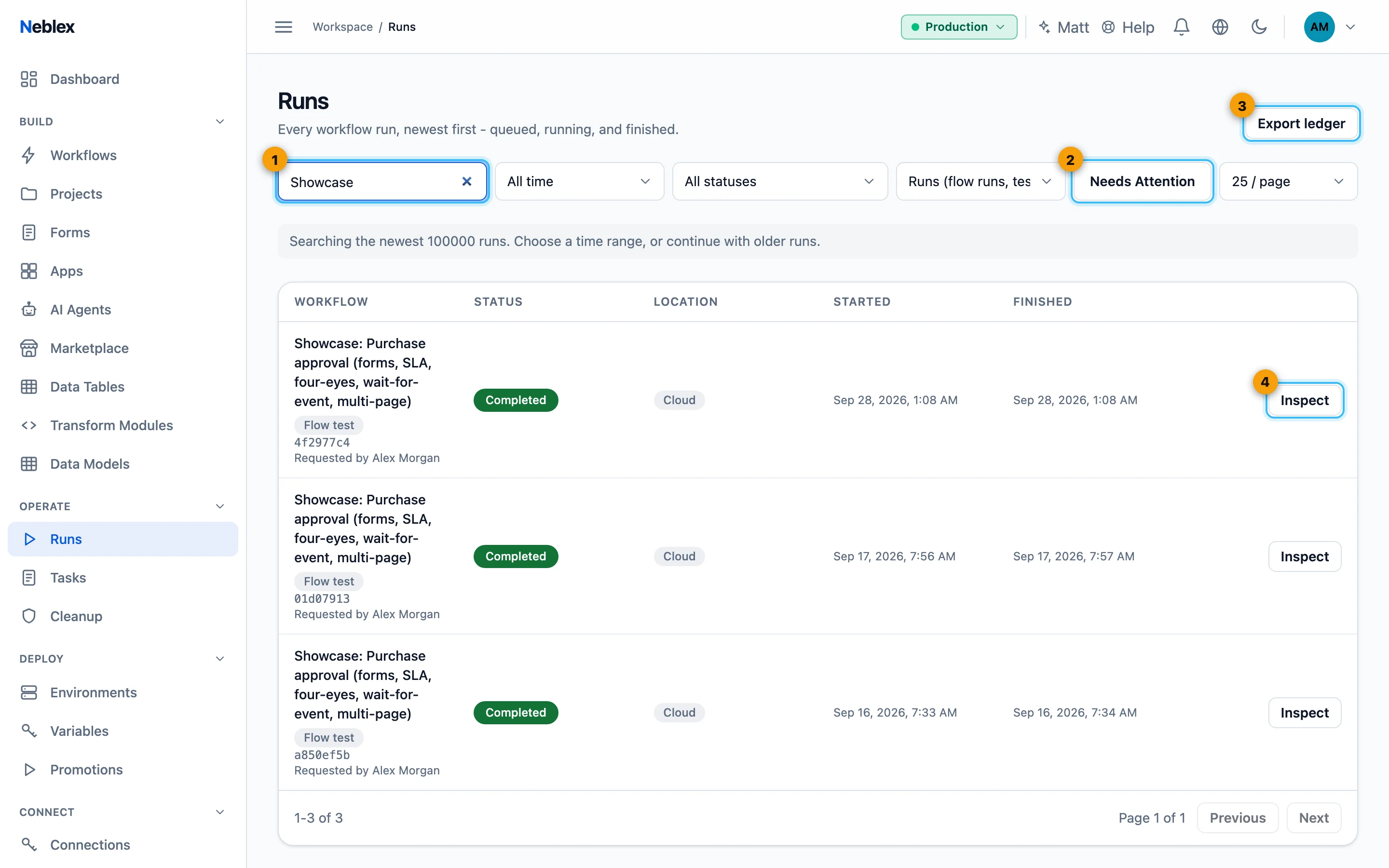
- Search by flow or failure reason.
- Show only runs that need you.
- Download a signed run ledger.
- Inspect a run step by step; Replay continues a failed one.
Inspect a run
Click Inspect. You see every step in order with its status (completed, failed, in progress, skipped or never reached), timing, the records it produced and any error message with its cause. Values in errors that could be sensitive are masked, while names and identifiers are kept so you can act on them.
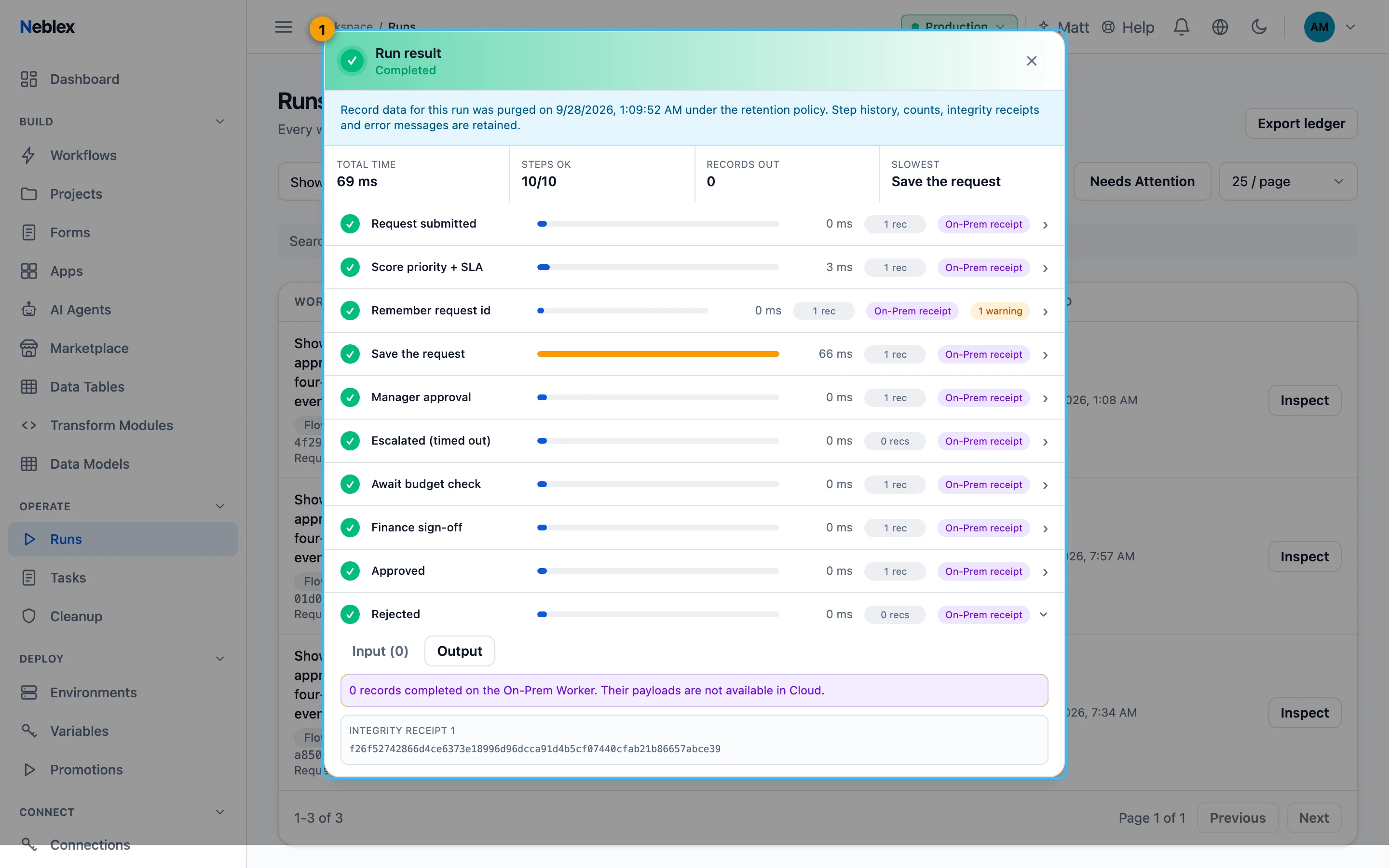
- Every step with its status, timing, output and any error.
Stop a run
Stop cancels a running run. Work that has started is stopped cleanly and the run is marked Cancelled with who stopped it.
Retry a failed run from the step that broke
- Fix the cause. Correct the connection, data or step settings, and save.
- Retry. On the failure banner in the builder click Retry, or on Runs use Replay. The same run continues from the failing step with the current saved flow; earlier steps keep their results.
Retried steps really run again. Use idempotency keys on steps that create things, and check any step that is not safe to repeat before retrying.
Find and replay failures
Turn on Needs Attention to list only runs that need you, search by failure reason to group those with a shared cause (such as an expired credential), fix the cause once, then click Replay on each affected run. A run that cannot be replayed shows the reason instead of starting.
Runs on an On-Prem Worker that went away
If a Worker stopped while holding a run, the run explains when the Worker last held it. Once you have confirmed the Worker is really stopped, Close run and describe how you stopped it (for example "restarted the Worker service on the host"). The run then ends with your explanation recorded.
Export the run ledger
Export ledger downloads the runs between two dates as CSV (with a digest and signature) or JSON (a signed envelope), for your own records or auditors.
See a flow's health
On Workflows, Health opens a flow's health page: success rate, total, failed and in-progress runs, median and 95th-percentile duration, daily volume, source schema changes, messages not accepted and the top failure reasons over 7, 30 or 90 days.
Get told about failures
The 🔔 bell lists recent failures with links to the runs. For email or chat alerts set up Alerts; to feed your own monitoring use Telemetry export.