Data quality in an integration flow: stop bad records before they land
By Adan Potyondy, Head of GTM
Why check data in the flow?
Once a bad record reaches a CRM, ERP or warehouse, it is copied to reports, synced to other systems and acted on, and someone has to find and fix it later. Stopping it in the flow is cheaper.
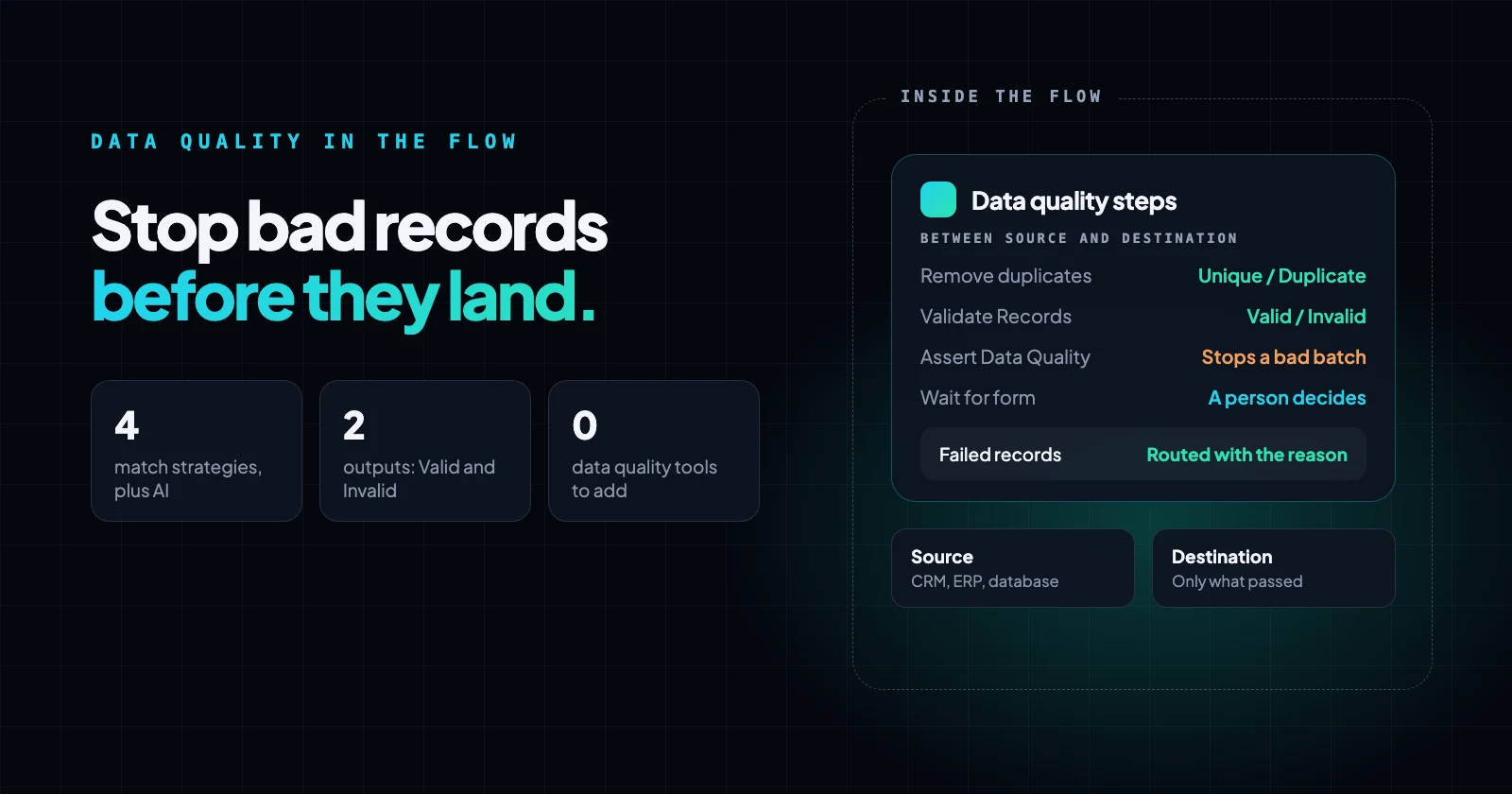
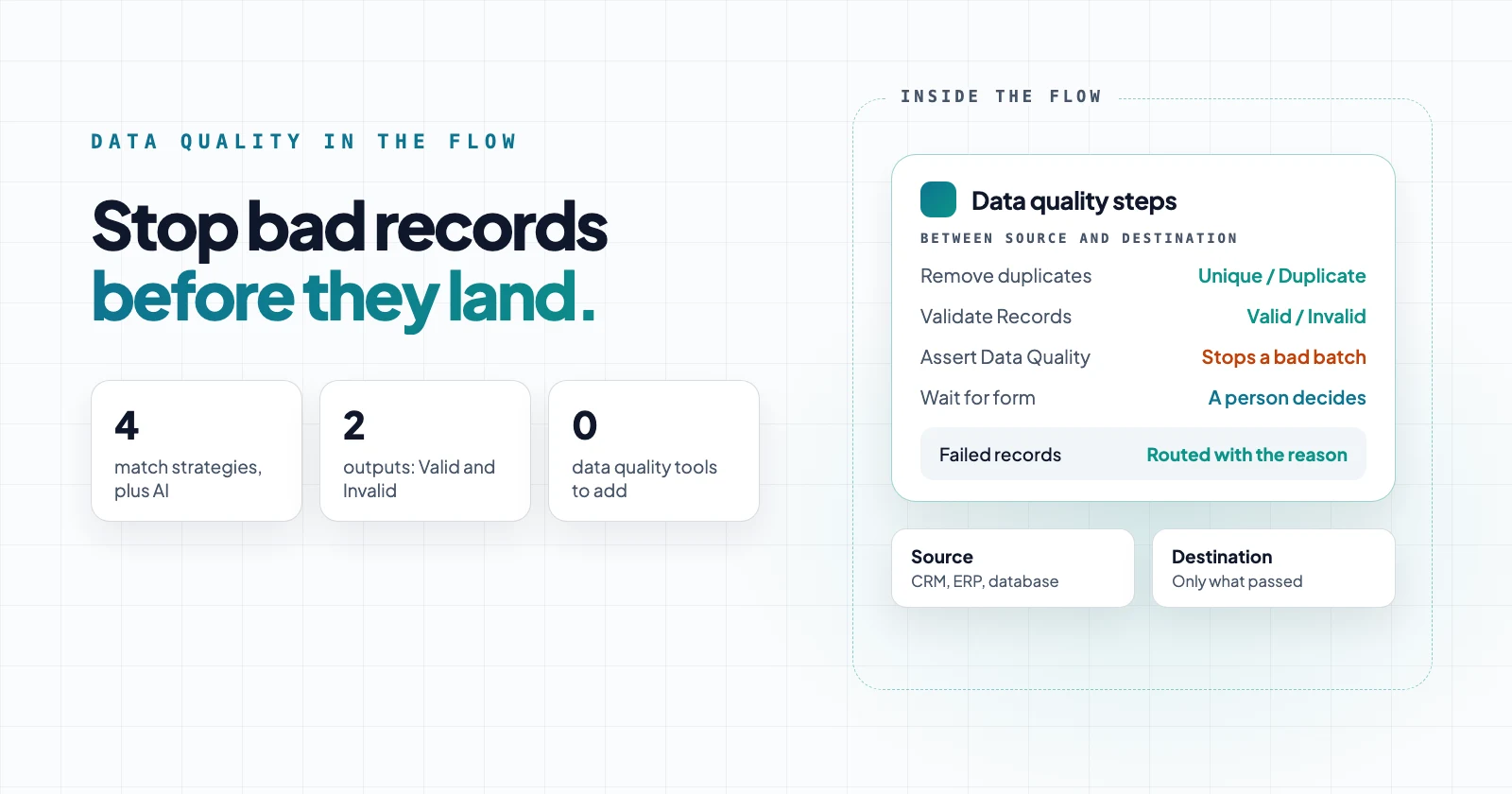
Data quality steps sit between the source and the destination. The destination receives only the records that passed, and everything else takes its own path, with the reason attached.
The data quality steps
Each of these is a native step in the flow builder:
| Step | What it does | Use it for |
|---|---|---|
| Remove duplicates | Removes or tags repeated records with exact, fuzzy or phonetic matching | Duplicate customers, leads or orders |
| Validate Records | Checks each record against a JSON Schema and tags it valid or invalid | Required fields, types, allowed values, patterns |
| Assert Data Quality | Checks the whole batch and stops with details when a rule fails | Empty files, missing columns, out-of-range values |
| Data Models | Define a canonical shape, such as Customer or Order, and check mappings against it | One standard record across systems |
| Edit text | Trims, changes case, finds and replaces | Normalizing names and emails before matching |
| Format date | Reformats dates into the pattern a system expects | Consistent dates across systems |
| Lookup | Adds a matching record from an earlier step | Enriching records, translating codes |
| Wait for form | Pauses the run for a person to review, correct or approve | Human review of uncertain records |
| Hash value | Creates a SHA-256 or SHA-512 fingerprint of a field, or a keyed HMAC | Pseudonymizing identifiers before sharing |
What does data quality mean in an integration?
It usually means four things:
| Capability | What it does | In Neblex |
|---|---|---|
| Validation | Checks that each record is valid, such as required fields and an email format | Validate Records for each record, Assert Data Quality for the whole batch |
| Standardization | Makes inconsistent values consistent, such as TX and Texas | Edit text, Format date and mapping to a canonical Data Model |
| Deduplication | Finds the same record entered more than once | Remove duplicates with exact, fuzzy or phonetic matching, plus semantic matching in an AI Agent step |
| Matching and survivorship | Decides which of the matching records wins | Remove duplicates keeps the first record, so a Sort step ahead of it chooses the winner; matched records can take their own path |
What to test in a proof of concept
When you evaluate an integration platform for data quality, run these checks. This is how each one works in Neblex:
| Check | In Neblex |
|---|---|
| Detect exact duplicates | Remove duplicates, exact match on one field, several fields or the whole record |
| Detect fuzzy duplicates, such as Jon Smith and John Smith at the same address | Jaro-Winkler, edit distance or Soundex on a combined key such as name, address and phone. An AI Agent step adds semantic matching, for example Bob Smith and Robert Smith with the same phone |
| Validate emails, phone numbers and addresses | Pattern and required-field rules in Validate Records. Postal address verification isn't built in; call a verification service from the flow with an HTTP Request step |
| Standardize names, addresses and other fields | Edit text and Format date before matching, and a canonical Data Model as the standard |
| Configure matching rules | Choose the fields, a combined key and a similarity threshold |
| Merge duplicates and choose what survives | A Sort step decides which record Remove duplicates keeps; an AI Agent step or a person settles the rest, value by value |
| Quarantine invalid records instead of rejecting them | Separate Valid and Invalid outputs to a quarantine table or a review form |
| Keep an audit trail | Every run keeps a step-by-step record, and a failed run can be replayed from the failing step; decisions can also go to an append-only log in your database |
Deduplication: exact, fuzzy, phonetic and semantic
- Four match strategies in Remove duplicates: exact match, fuzzy Jaro-Winkler for names and typos, fuzzy edit distance (Levenshtein), and phonetic Soundex for names that sound alike.
- Match on several fields: compare one field, several fields as a combined key, or whole records. A reliable match combines a name with other fields, such as address, phone, email or company. Fuzzy strategies use a similarity threshold, 90% by default.
- Semantic matching with an AI Agent step: for records that mean the same thing but are written differently, such as Robert Smith and Bob Smith with the same phone and address, or International Business Machines and IBM at the same headquarters. The agent runs on a model from a connection you choose, which can run inside your network when the flow runs on the On-Prem Worker.
- Choosing which record survives: the first occurrence wins, so sort first, for example with the most recently updated record on top.
- Remove or review: remove duplicates outright, or turn on Keep duplicates for branching. Every record is then kept and tagged
_duplicateand_dup_of, and duplicates leave on their own output, ready for a review path. - AI stewarding for the rest: send the duplicates rules can't settle to an AI Agent step that acts as data steward. It decides whether the records are the same, picks the surviving record and values, and sends low-confidence decisions to a person to confirm. Rules settle the clear cases; AI only sees the ones that need judgment.
- Normalize first: exact matching is case-sensitive, so trim and lowercase emails with Edit text before matching on them. Fuzzy matching ignores case.
Some duplicates are created by the integration itself, when a write is retried after a timeout or a failed run is replayed. Turn on Idempotency key on a connector or HTTP step and a retry or resume sends the same key, so a destination that honors the key applies the change only once. Where a destination has no such key, write by a unique field with an upsert. Retries also stop on their own when a change may already have been applied and isn't safe to repeat.
Validation and batch checks
Validate Records checks every record against a JSON Schema: required fields, types, allowed values, lengths and ranges, patterns, and combined rules. Every record is kept and tagged _valid, with _validation_error naming the first rule it broke, and valid and invalid records leave on separate outputs.
Assert Data Quality checks the batch as a whole: a row count between a minimum and maximum, required fields, numeric ranges and a condition on every record. When a check fails, the step fails and lists up to five violations. It also catches a source that changed shape, such as a renamed or missing field, before that reaches the destination.
A failed check stops the run by default. Set On error to Route the error onward and the flow receives one record describing the failure instead, so it can alert someone or take a repair path.
Canonical data models
A canonical data model defines what a good record looks like once, for every system. A Data Model describes a shared business shape, such as Customer or Order, that each system maps to and from, so the core of a flow stays stable while the systems at the edges change. Models are built into the platform, with a visual designer.
- Define the standard: each field has a type, whether it is required, a format such as email, date-time or uuid, and optional allowed values. Nested records and lists are supported.
- Check every mapping against it: set the model as the output contract of Map fields or Transform items, and the step's result is checked against the model. Models are not applied to flows automatically.
- Catch breaking changes early: compare a new or changed schema with the model. Each difference, such as a removed field, a changed type or a newly required field, is marked Breaking or Compatible, or flagged for review when its effect can't be proven.
- Change it safely: models keep a version history, and a deleted model goes to Trash and can be restored.
Where do records that fail go?
They are routed, not lost. Send them to a quarantine table in your own database, to a person, or to a Neblex Data Table. A Data Table lives in the Neblex cloud, so flows on the On-Prem Worker that must keep records local should use their own database.
- Wait for form pauses the run and gives a reviewer the record to correct or approve, with assignment, due dates and escalation.
- Different person must decide adds a four-eyes check: the person who started the run, or who decided an earlier step of it, can't decide this one.
- The run shows every step with its status, timing and the records it produced, and each invalid record carries the rule it broke. A run a check stopped can be replayed from that step once the cause is fixed.
How AI agents help with data quality
Rules handle most records quickly and predictably. For the judgment calls they can't make, build an AI agent and add it to the flow as an AI Agent step after the rule-based steps, so it sees only the records the rules couldn't settle, for example those on the Duplicate output of Remove duplicates.
You describe the agent's job and your rules in plain language. Agents you can build for this:
- Duplicate steward: reviews possible duplicates, decides whether two records are the same customer, applies your rules to choose the surviving record and values, and says why.
- Plausibility checker: flags records that pass the schema but don't make sense, such as placeholder names, values in the wrong field, or personal data typed into a notes field.
- Fix suggester: proposes a corrected value with its reason, for a person to accept or reject.
- Batch reviewer: looks at a summary of the batch, such as row counts and null rates against the last run, and recommends whether to load, warn or hold.
Tell the agent to answer in a fixed JSON format with a verdict and a reason, read it with a Convert JSON step, and the flow can branch on the verdict. Send uncertain or high-impact verdicts to Wait for form so a person decides before anything changes, and turn on Require human approval for any tool the agent can use to write data.
Agents run on the model provider you connect, and their reasoning and embedding models can run inside your network with the On-Prem Worker. Every tool an agent uses is recorded with the run. Describe an agent in plain English and your model drafts it for you to review, or build it from your AI client through the Neblex MCP server. More on agents: AI agents in Neblex.
Example: an AI duplicate data steward
This solution deduplicates a customer table in layers, so AI only sees the pairs rules can't settle:
- Match on premises: pre-processing and fuzzy matching, inside groups such as zip code, run on the On-Prem Worker, so raw customer data stays in your network.
- Settle the clear pairs by rule: an exact pass runs alongside the fuzzy pass, and pairs are merged automatically only where both agree.
- Let an agent review the rest: an AI agent reviews the pairs the rules disagree on, from masked data, and returns a verdict, a confidence and a reason. Separate thresholds decide what is merged or dismissed automatically.
- A data steward decides the uncertain cases: anything below the thresholds becomes a review task: merge as proposed, keep a different record, or keep them separate.
- Keep an audit trail: original records are never changed. In your database, every decision goes to an append-only log, merged values to a golden-record table, and each duplicate gets a pointer to the record it merged into.
In our test on 976,000 records, matching and routing took 28 minutes on one On-Prem Worker, and rules settled 26,102 of 26,166 candidate pairs before any AI call. Thresholds, batch size and an on/off switch live in a settings table. Our measurement post covers what this matching costs in CPU and memory.
Example: profiling and scoring a batch
This one scores each batch and each record before it loads, so a bad delivery is held instead of loaded:
- Profile the batch: native steps such as Group and summarize compute row counts, missing values and out-of-range counts for the batch.
- Compare with the last good run: the profile is compared with a stored baseline, so a sudden jump in missing emails or a drop in row count stands out.
- Let an agent score it: an AI agent reads the profile and recommends load, warn or hold, with its reasons. At record level, an agent can score each record pass, review or fail with reason codes and a suggested fix.
- Gate the load: the flow branches on the score: load, alert the data owner, or hold the batch with Assert Data Quality and send it to a person to review.
Example: a clean lead import
- Read: a lead file, or leads received from a form or webhook.
- Normalize: with Edit text, trim and lowercase email addresses.
- Deduplicate: with Remove duplicates, exact match on email, then Jaro-Winkler on company name, with possible duplicates sent to review.
- Validate: with Validate Records, require name and email, and check the email pattern and allowed country codes.
- Load: valid, unique leads go into the CRM; invalid records and possible duplicates go to a review form with the reason attached.
All three examples use the same order: native rule-based steps first, an AI agent for judgment calls, and a person for anything uncertain.
Sources
- Remove duplicates, Validate Records and Assert Data Quality, Neblex Integration Fabric docs
- Data Models, Neblex Integration Fabric docs
- Neblex internal tests, October 2026.
Last checked: November 5, 2026.
Frequently asked questions
Is data quality a separate product or add-on?
No. Remove duplicates, Validate Records, Assert Data Quality and the other steps in this post are native steps in the Neblex flow builder, and the free plan includes them. You add them to a flow like any other step.
Which matching methods does deduplication support?
The Remove duplicates step offers exact match, fuzzy matching with Jaro-Winkler or edit distance (Levenshtein), and phonetic matching with Soundex. Fuzzy strategies use a similarity threshold, 90% by default. Semantic matching, which compares records by meaning, runs in an AI Agent step on a model you connect.
Does Neblex support survivorship rules?
Not as a setting in Remove duplicates: it keeps the first record, so a Sort step ahead of it decides which one survives. Matched records can go down different paths, for example one to merge and one to a person for review. For value-by-value decisions, an AI Agent step can act as the data steward and send low-confidence decisions to a person.
Does Neblex verify postal addresses?
Not natively. Validate Records checks address fields for required values, patterns and allowed values. To verify an address against postal data, call an address verification service from the flow with an HTTP Request step.
Can possible duplicates go to review instead of being deleted?
Yes. With Keep duplicates for branching, every record is kept and tagged _duplicate and _dup_of, and the step has separate Unique and Duplicate outputs, so duplicates can go to a review path.
Does Neblex support canonical data models?
Yes. Data Models are built in and define a shared business shape, such as Customer or Order, with field types, required fields, formats and allowed values. Set one as the output contract of a mapping step and its result is checked against the model.
Can a retry or a replayed run create duplicate records?
Retried steps really run again, so protect the writes that create things. Turn on Idempotency key on the connector or HTTP step and a destination that honors the key applies the change only once. Where a destination has no such key, write with an upsert on a unique field.
What happens to records that fail validation?
Validate Records keeps every record and tags it _valid with the first rule it broke, and sends valid and invalid records down separate outputs. Invalid records can go to a quarantine table, a review form or a notification, while valid records continue.
Can a bad batch be stopped before it loads?
Yes. Assert Data Quality checks the batch, for example row count, required fields and numeric ranges, and fails with the violations listed when a check fails. Set On error to Route the error onward to handle the failure in the flow instead of stopping the run.
Do the checks work for flows that run on premises?
Yes. The steps run wherever the flow runs, in the Neblex cloud or on the Neblex On-Prem Worker inside your network, so records from local systems are checked without leaving it.
Can I build an AI agent for data quality?
Yes. Build an agent that reviews possible duplicates, flags implausible records or suggests fixes, and add it to a flow as an AI Agent step after the rule-based checks. Uncertain or high-impact cases can go to a person for approval. Agents run on the model provider you connect, and their models can run inside your network.
Is Neblex a master data management (MDM) system?
No. Neblex checks and routes records in flight, inside each integration. It doesn't keep a golden record; records that need to persist live in your own systems, or in a Data Table you choose to use.
Bring us the product or the integration that hurts most
We will build it with you, on your data, with the run log open.