Load an on-prem database into a cloud warehouse: 1 million rows, measured
By Adan Potyondy, Head of GTM
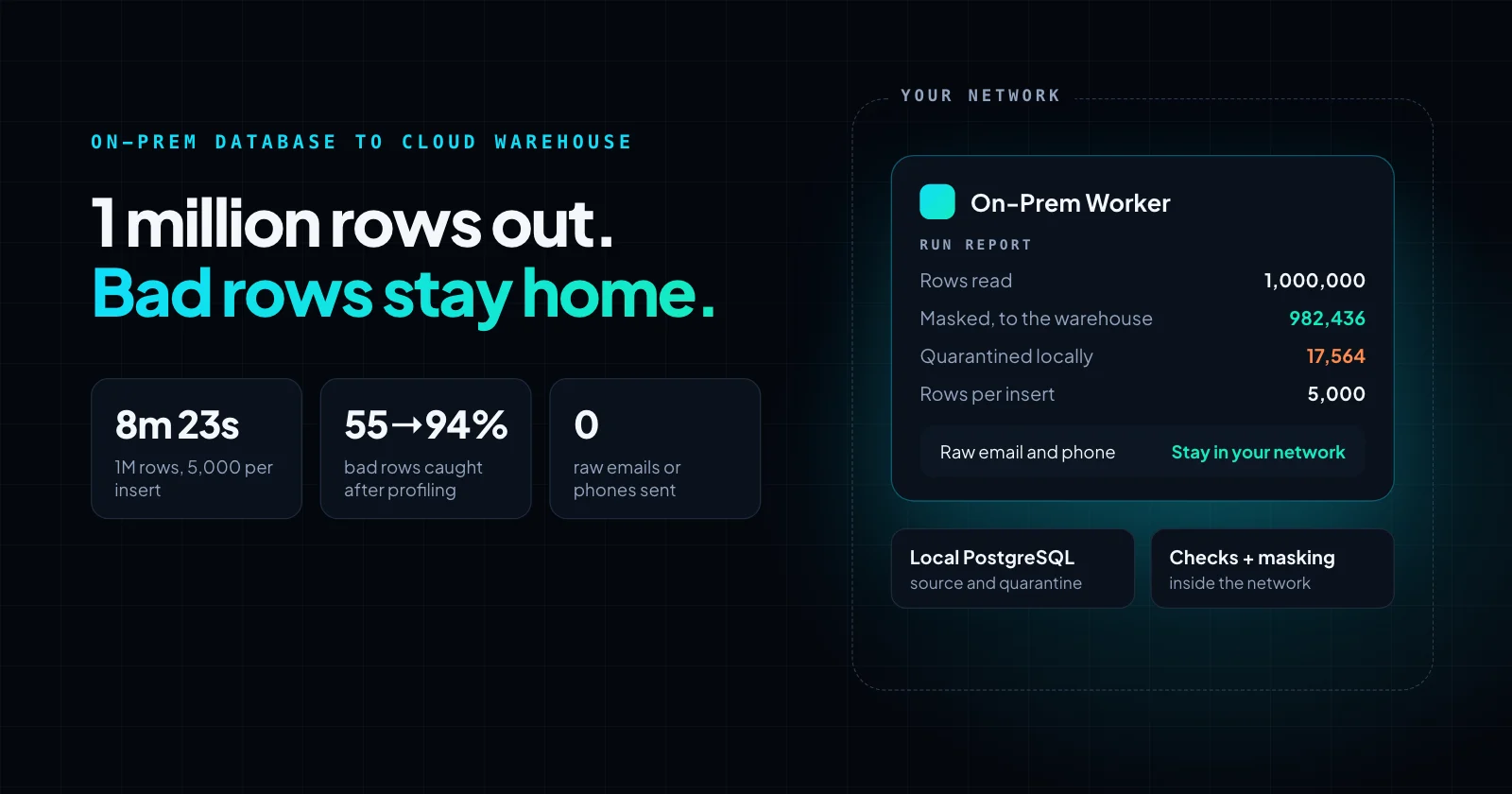
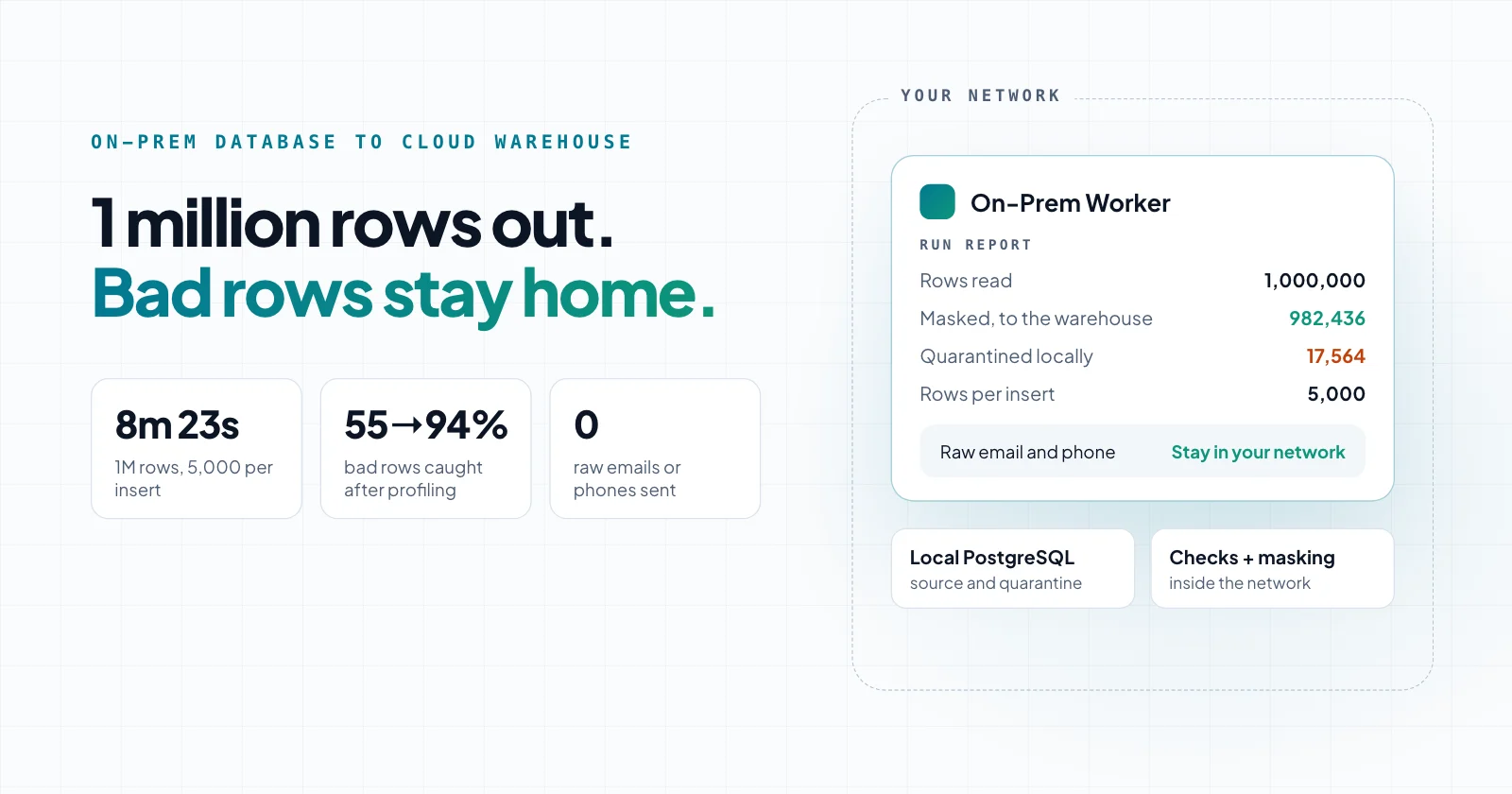
The request we hear often
Moving data from a database inside a company's network to a cloud warehouse, usually as a scheduled ETL job, is a request we hear often. The questions are always the same: how long will it take, will bad rows reach the warehouse, and does personal data leave the building?
Our measurement post covered what the runtime costs your server. This one runs the load: 1 million rows from an on-prem PostgreSQL database into Supabase, checked and masked on the way.
How we tested
- Source: PostgreSQL 18 on the test machine, with a test table of 1,000,000 customer records (206 MB).
- Problem rows: 18,675 rows, about 1.9%, with a bad email, state or phone, or a test account. Each problem came in one of 6 to 9 forms we see in real data, such as a misspelled domain, "N/A" in the state field or an all-zeros phone, and about 1 in 9 of these rows had a second problem.
- Unusual but valid rows: 5,325 rows that should pass, such as a surname starting with "Test", a phone with an extension or a state written in full.
- Answer key: a separate table recorded every problem row and every unusual row, so we could score each run.
- Runtime: the On-Prem Worker, our local integration runtime, running as a background service on the test machine.
- Destination: Supabase, a hosted Postgres database, in us-west-2, through its connection pooler. It stood in for the cloud warehouse.
- Line: a home internet connection, 30 to 44 Mbps up. Measured before every timed run: 31 to 110 ms idle latency.
We kept the error rate low on purpose. In a peer-reviewed study of 75 data quality assessments, 47% of recently created records had at least one critical error; our test had problems in 1.9% of rows, across four fields.
We sampled the runtime's CPU, memory and network traffic throughout, and after each run compared what arrived in Supabase with the answer key. Supabase is Postgres, not a warehouse like Snowflake or BigQuery, which usually load from staged files; the lesson below carries over either way: send fewer, larger loads.
What set the speed: rows per insert
The runtime spent most of each run waiting for the warehouse to accept inserts, so the number of rows per insert decided the time.
| Rows per insert | Rows read | Runs | Time | Rows per second (median) |
|---|---|---|---|---|
| 1 | 500 (sample) | 1 | 195 s | 2.6 |
| 100 | 1,000,000 | 5 | 21 min 46 s to 22 min 53 s (median 21 min 53 s) | 762 |
| 1,000 | 1,000,000 | 5 | 9 min 56 s to 10 min 38 s (median 10 min 22 s) | 1,608 |
| 5,000 | 1,000,000 | 5 | 8 min 18 s to 8 min 48 s (median 8 min 23 s) | 1,988 |
| 10,000 | 1,000,000 | 5 | 7 min 56 s to 8 min 59 s (median 8 min 37 s) | 1,934 |
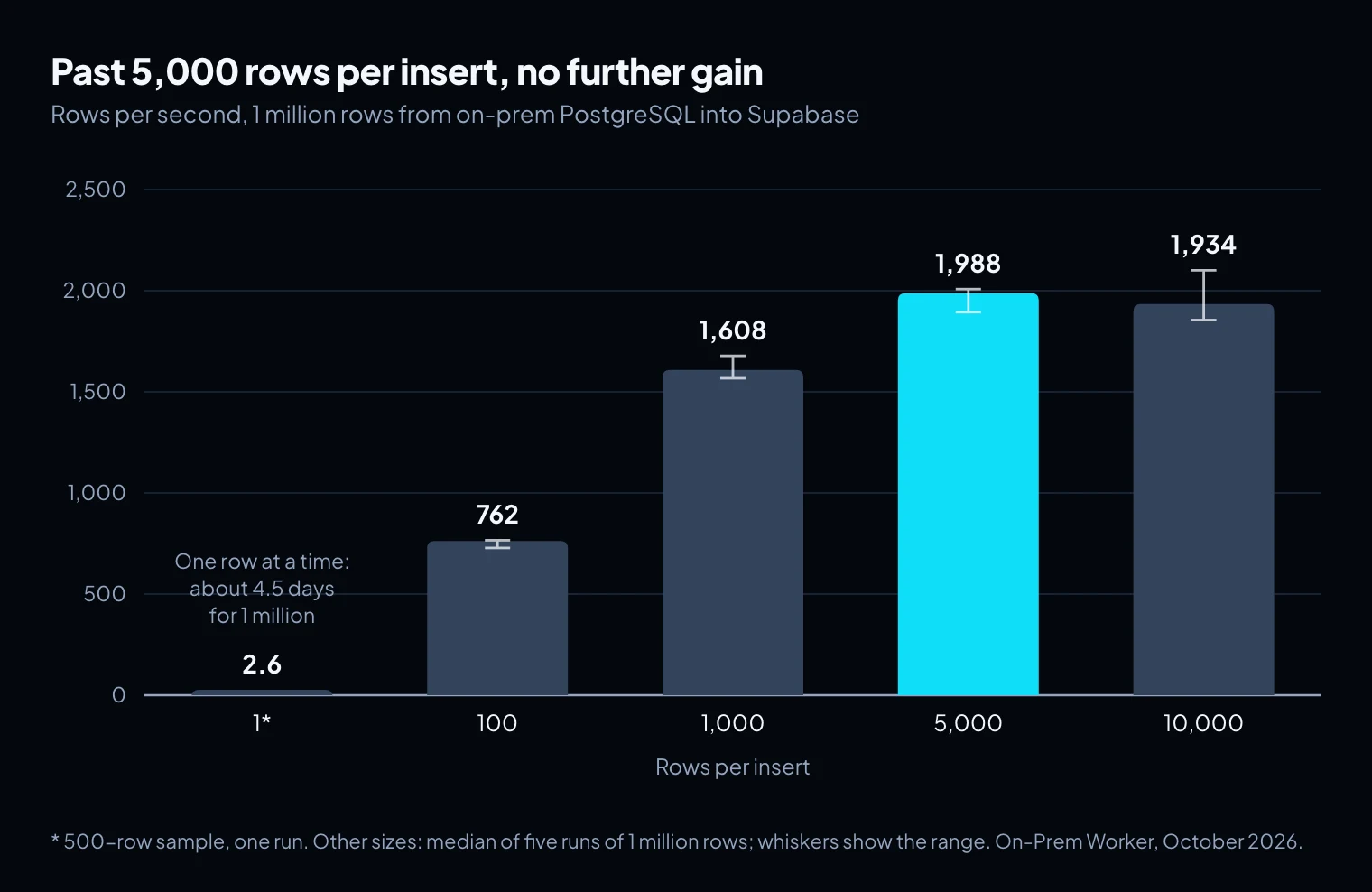
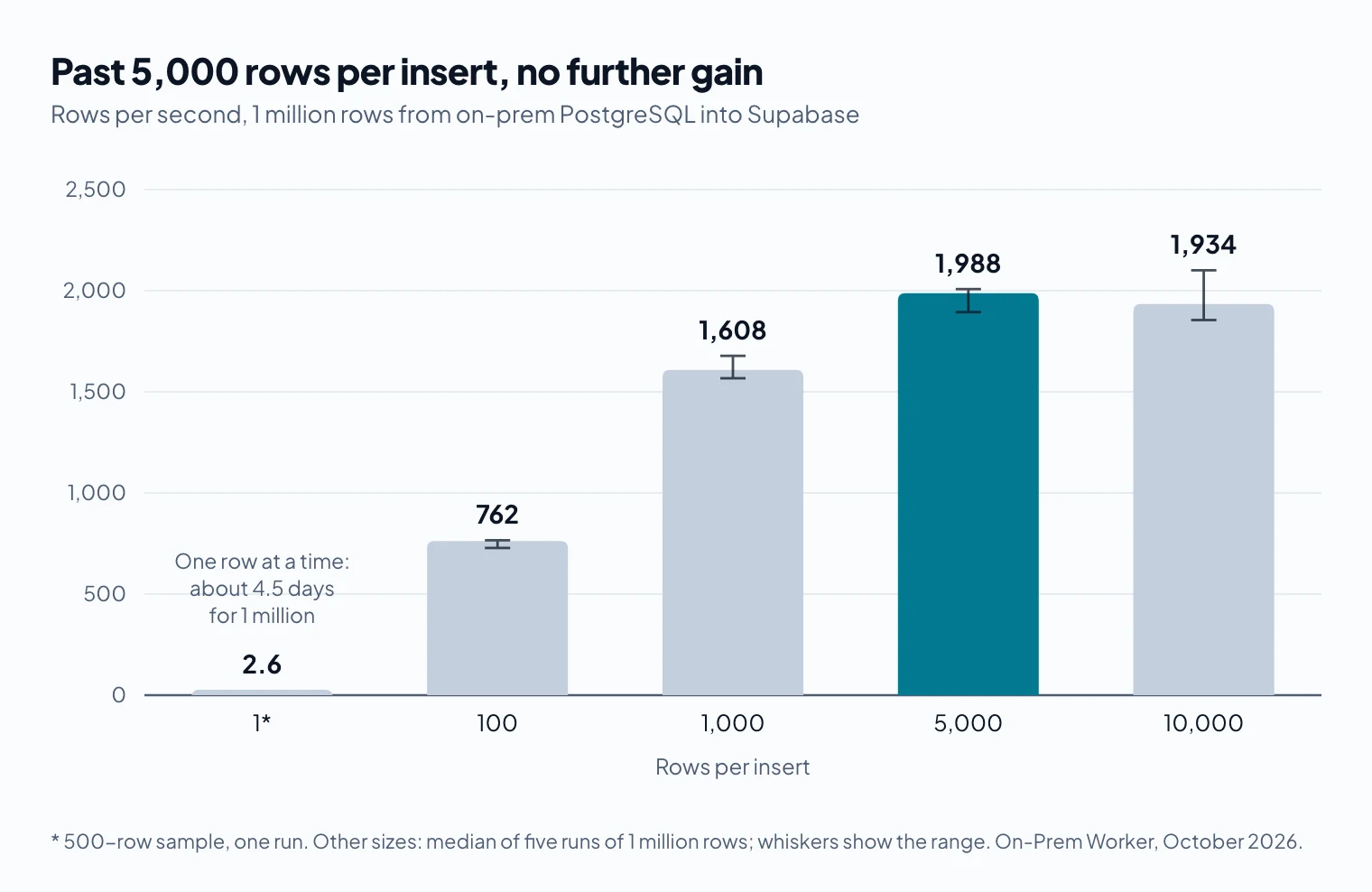
Each setting ran five times on the same day. At 5,000 rows per insert, the slowest run took 6% longer than the fastest, and 10,000 overlapped it.
One row per insert took about 0.39 seconds per row, or four and a half days for 1 million rows. Each insert pays a full round trip to the warehouse, which dwarfs the work of inserting one row.
Engineering write-ups show the same shape at higher speeds. In one, run against a database on the same laptop, batching took inserts from about 2,284 to 37,465 rows per second. The PostgreSQL documentation gives the same advice: fewer, larger statements, and COPY where you can use it.
Past 5,000 rows per insert there was no further gain: each insert gets bigger and slower to send and parse. Your best size depends on latency, row width and warehouse, so measure a few sizes rather than picking the largest.
Where the time went
Step timings for one page of 100,000 rows, from the run logs, with our first checks and the rewritten checks described below:
| Step | First checks | Rewritten checks |
|---|---|---|
| Checks | 1.7 s | 11.9 s |
| Normalize email, domain and phone | 1.8 s | 2.8 s |
| Route rows to load or quarantine | 1.1 s | 1.2 s |
With the first checks, the 20 inserts took 33.5 of the page's 43 seconds. The rewritten checks added about 11 seconds per 100,000 rows. Inserts still set the pace, but thorough rules are not free: checks and normalizing went from about 8% of the page's time to nearly 30%.
Which checks should run before rows leave the network?
Run the checks that decide whether a row may leave at all; anything you can only fix at the source belongs here. We started with four, each a single rule on one field:
| Check | First rule | Bad rows caught (held-out half) |
|---|---|---|
| contains an "@" | 46% | |
| State | not empty | 60% |
| Phone | at least 10 digits | 74% |
| Test account | on the test domain, or starting with "test" | 43% |
Together they caught 54.6% of the bad rows in the half we later held out, and wrongly quarantined 5.6% of the unusual but valid rows, such as surnames starting with "Test". Each miss has a plain cause: a misspelled domain still contains an "@", "N/A" is not an empty state, and an all-zeros phone has 10 digits.
The weak rules also hid two masking bugs. Emails with two "@" signs put part of the address in the domain field of 402 warehouse rows, and for phones with an extension, the "last 4 digits" were the extension's.
Improving the rules from a profile of the data
Rules only catch what someone thought to write down, so we did what a data team would do: look at the data, then rewrite the rules. The difference is that Claude did the work through the Neblex MCP server, and nobody edited the flow by hand.
- We split the table into two halves by a hash of each row's id.
- Claude built and ran a profiling flow on the first half through MCP: counts and patterns, not rows. For example, every state value and its count, the shapes of phone numbers, the most common email domains, and values that repeated 4 or more times.
- A second Claude session, given only that profile and our four rules, drafted new rules and listed what they would still miss. It never saw the data, the answer key or how the test data was made.
- Claude wrote the new rules into the flow's check and masking steps through MCP. The checks went in exactly as drafted; the masking fixes were written to the drafted spec.
- We scored the new rules on both halves against the answer key. The second half was never profiled.
The model worked from a summary produced inside the network, never from customer rows, and it changed the same governed flow a person would edit in the designer. One caution if you do this on real data: repeated values can be real phone numbers or emails, so mask them or raise the threshold before the profile goes to a model.
| Field | First rule | Rewritten rule (summary) |
|---|---|---|
| contains an "@" | exactly one "@", valid characters and domain, not a known misspelled domain or placeholder such as noreply@ | |
| State | not empty | a US state code or name; "N/A", "unknown" and similar count as missing |
| Phone | at least 10 digits | 10 digits after dropping a leading 1 and any extension, and not a placeholder such as all zeros |
| Test account | test domain, or starts with "test" | test domains, "test" or "testuser" as a name or address, keyboard mashes such as asdf@ |
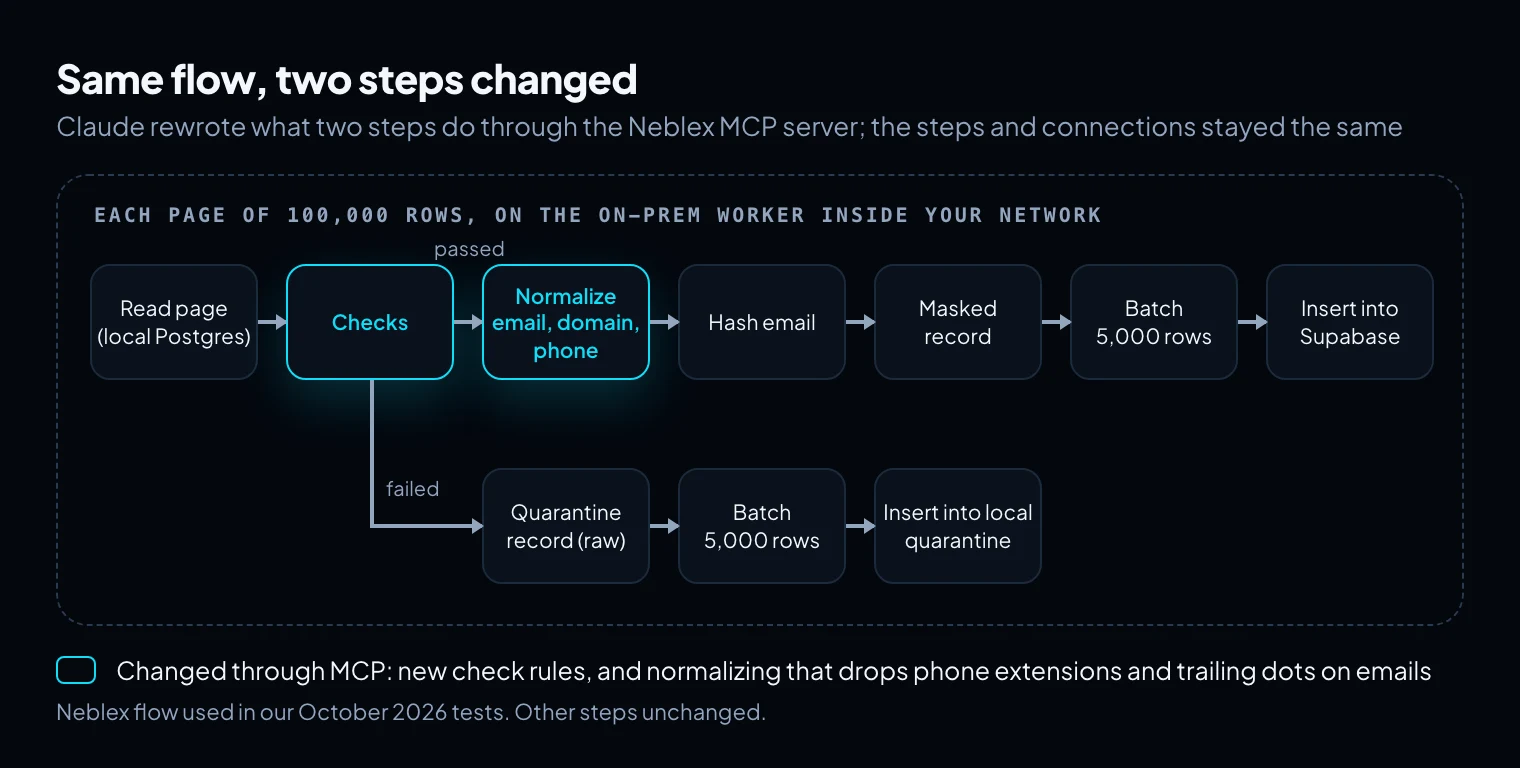
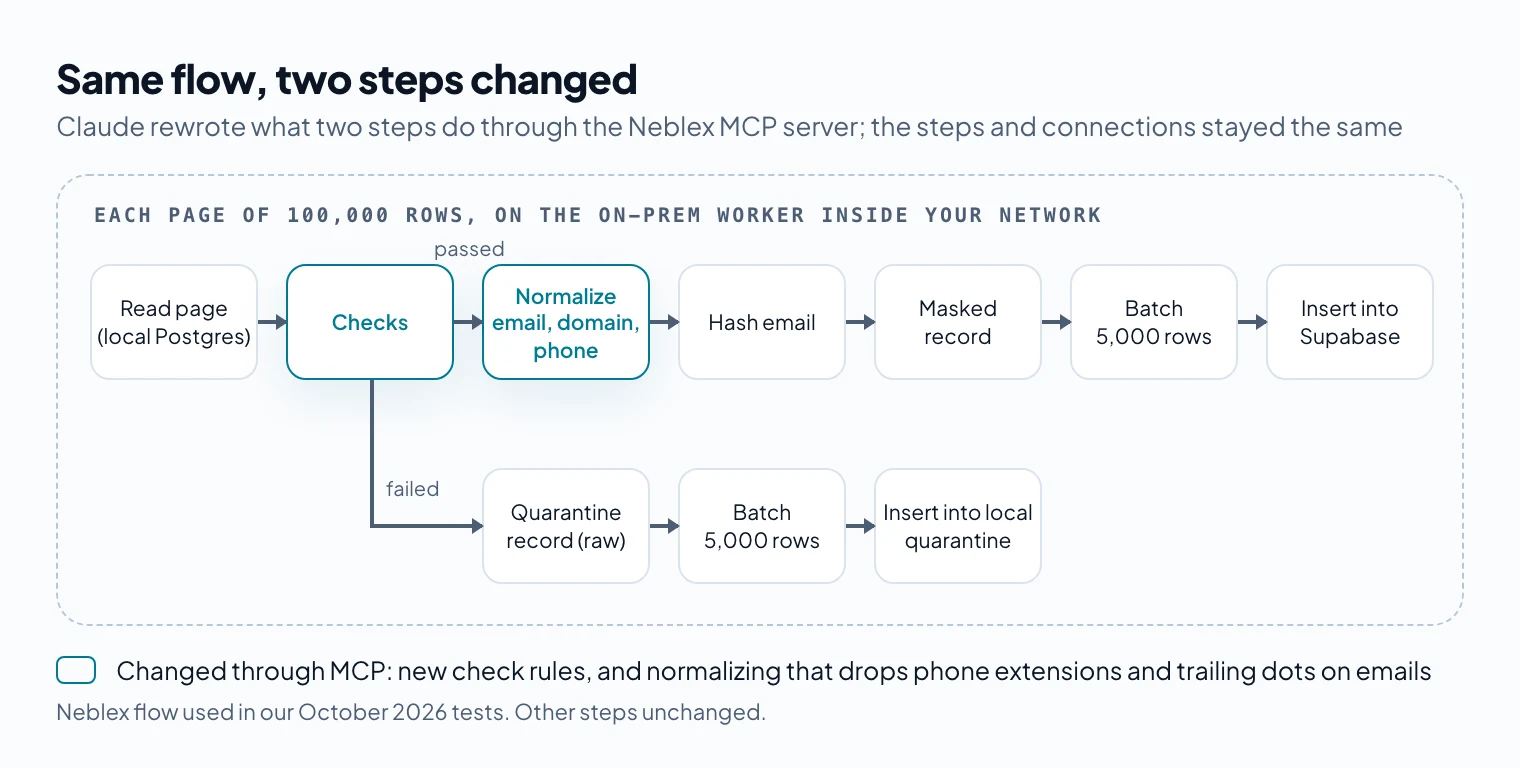
| First checks | Rewritten checks | |
|---|---|---|
| Bad rows caught, profiled half | 55.3% | 94.4% |
| Bad rows caught, held-out half | 54.6% | 93.7% (8,701 of 9,289) |
| Unusual but valid rows quarantined, held-out half | 5.6% | 0% |
| Normal rows quarantined, held-out half | 0 | 0 of 485,638 |
The held-out half scored within a point of the profiled half, so the rules were not fitted to particular rows. Both masking bugs were fixed.
The rewritten rules still missed some rows in the held-out half:
- Domain misspellings not on their list: 62 of 613. The drafted rules themselves suggested an edit-distance check for these.
- Test accounts the profile never showed: "demo" and "qa+" addresses, and placeholder names such as John Doe. These were caught in 17%, 14% and 49% of cases.
- Emails ending in a dot: the rules strip the dot and load the address. Our answer key counted these as bad. If you count stripping the dot as a fix, the rewritten rules handled about 95% of the bad rows in the held-out half.
One limit: the held-out half had the same kinds of problems as the profiled half. The test shows the rules generalize to new rows, not to kinds of problems nobody has seen yet, which is exactly what the misses above are.
Where do the rows that fail go?
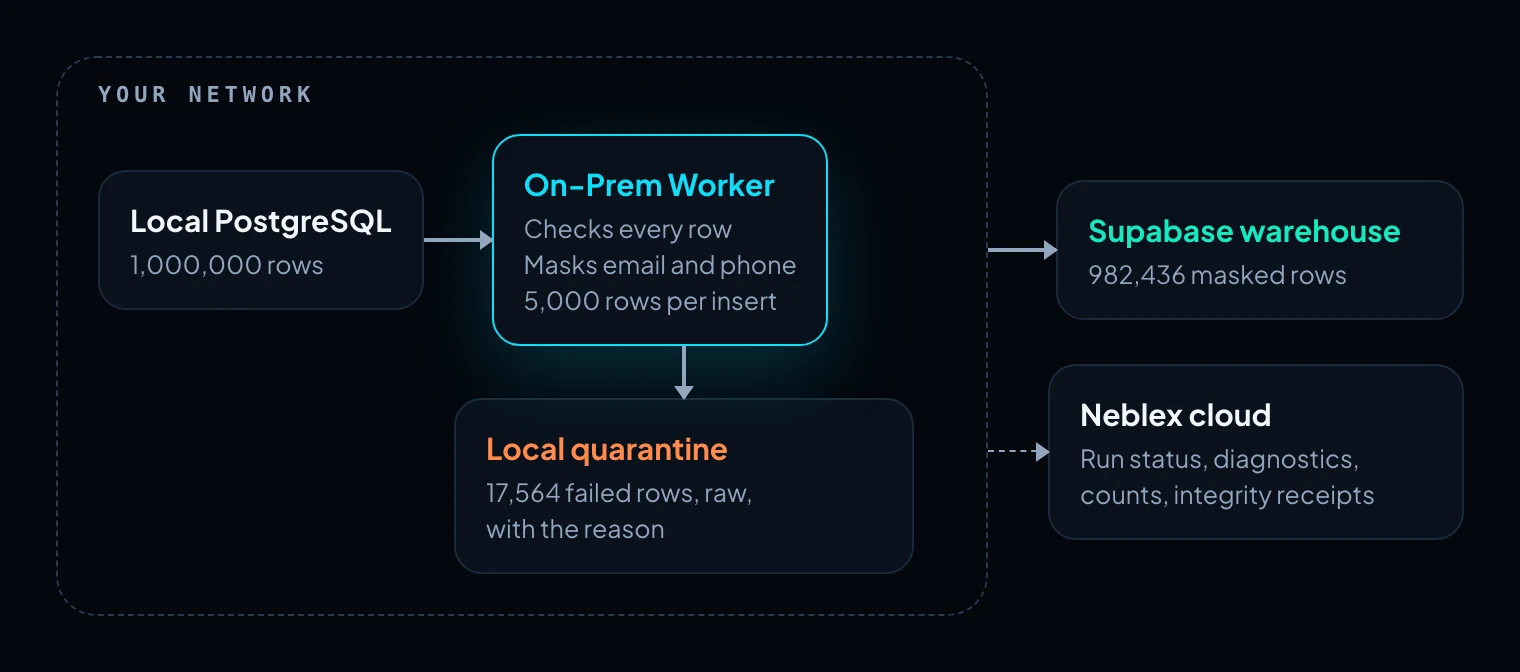
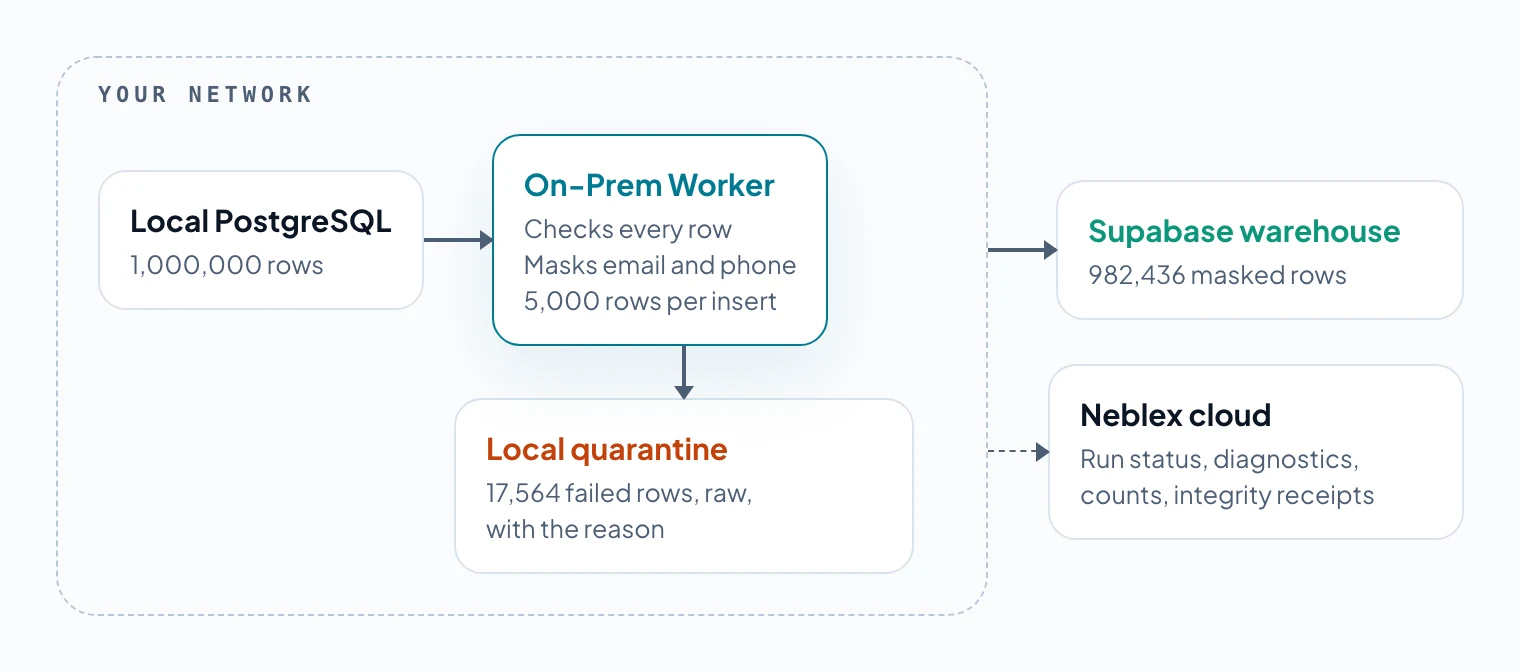
To a quarantine table in the same on-prem database, with their raw values and the reason they failed. No row is dropped, and the raw values stay inside the network.
The raw values are kept because a malformed email can only be fixed by someone who can see it. With the rewritten rules, every run quarantined the same 17,564 rows.
Masking before the load, and what hashing does not do
We kept three things per customer in place of the raw email and phone: a hash of the trimmed, lower-cased email, so two records with the same email still match; the email domain, for company-level reporting; and the last 4 digits of the phone, for support lookups. Names, company, city and state went through unchanged, because the reports needed them. That is a choice each team has to make field by field.
A hash is not anonymisation. The UK Information Commissioner's Office treats pseudonymised data as personal data and advises against hashes that use no salt, pepper or key. The US FTC put it more bluntly: "hashes aren't 'anonymous' and can still be used to identify users".
So use a keyed hash (HMAC) with a secret that stays on your side. Our timed runs used plain SHA-256. In an earlier test, a version built for production use, with a keyed hash and upserts instead of inserts, loaded 1 million rows in 8 minutes. The warehouse can still join on the hash; an outsider with a list of email addresses cannot reverse it.
After each run we checked the warehouse: 982,436 rows, no empty hashes, every phone field exactly four digits, and no "@" in any text column. The Neblex cloud received the run's status, diagnostics, counts and integrity receipts, not records; ask any vendor you evaluate to show this in their run logs.
After the first load: send only what changed
A one-time load is a backfill; after it, a scheduled job should move only the rows that changed. In an earlier production-style version tracking changes by updated_at and id, a run with nothing new took 0.3 seconds and a run with five changed rows took 1.8 seconds.
What the runtime used
CPU averaged 25 to 47% of one core. Upload was 372 to 395 MB per 1 million rows, around 6 Mbps of the 30 to 44 Mbps uplink, so the line was never the limit.
Memory varied more. Across 21 runs of 1 million rows, peaks ranged from 379 to 985 MB, highest at 100 and 1,000 rows per insert, while the median stayed under 210 MB in all but five runs. The runtime returned to 52 MB afterwards; size the machine for the peak. Our measurement post covers how the runtime handles memory as batches grow.
What can go wrong
- A slow line stretches the load but should not change the result. Over a poor mobile connection (500 to 950 ms latency), 1 million rows took about 29 minutes instead of about 8, and every row still arrived in the warehouse or quarantine.
- A write can fail with its outcome unknown: the warehouse may or may not have committed it. On the poor line, one insert dropped mid-flight and the run stopped for a person to decide instead of retrying blindly.
- Rules miss what the profile never showed. Profile again when the source changes.
- Incremental loads have edges. A row that later fails its checks stays in the warehouse with its last good values, and deletes in the source are not copied unless you handle them.
- Quarantine needs an owner. A quarantine table nobody reviews is a slower way of dropping rows.
How to set it up yourself
- Create the target table in the warehouse with only the masked columns, and a quarantine table in the source database with the row's id, the reason and the raw record.
- Read the source in pages ordered by key (
WHERE id > last_id ORDER BY id LIMIT 100000), on a runtime or job inside the network. - Profile the source before writing rules: distinct values of short fields, shapes of phones and emails, common domains. An AI assistant connected through MCP can run the profile and update the checks.
- Check each row and route failures to the quarantine table with their reason. Score the rules on a part of the data they were not written from.
- Mask the passing rows: a keyed hash of the normalised email, the email domain, the last 4 phone digits, and whatever else your policy requires.
- Group the masked rows into batches of a few thousand and send each batch as one statement. One way in PostgreSQL is to pass the batch as a single JSON parameter and expand it with
jsonb_to_recordset:
INSERT INTO customers_masked (id, email_hash, email_domain, phone_last4, city, state)
SELECT r.id, r.email_hash, r.email_domain, r.phone_last4, r.city, r.state
FROM jsonb_to_recordset(CAST(:batch AS jsonb))
  AS r(id bigint, email_hash text, email_domain text, phone_last4 text, city text, state text)
ON CONFLICT (id) DO NOTHING;After each run, compare counts on both sides: rows read, rows quarantined, rows in the warehouse. Once the first load is done, switch to incremental runs by updated_at.
These checks catch broken values, not duplicates. The data also held 20,000 near-duplicate customers that passed every check and loaded as clean rows; an upcoming post covers finding and merging them.
The takeaway: to load an on-prem database into a cloud warehouse, tune rows per insert first, check and mask inside your network, and write your rules from a profile of your own data, then test them on rows they have not seen.
Sources
- Nagle T, Redman T, Sammon D, Assessing data quality: A managerial call to action, Business Horizons 63(3), 2020, pp. 325-337
- FTC Office of Technology, No, hashing still doesn't make your data anonymous, July 24, 2024
- UK Information Commissioner's Office, Pseudonymisation (guidance)
- PostgreSQL documentation, Populating a Database
- PostgreSQL documentation, JSON Functions and Operators
- Alexander Belanger, The fastest Postgres inserts, Hatchet, May 15, 2025
- Connect an AI client (MCP), Neblex Integration Fabric docs
- Neblex internal tests, October 7 to 28, 2026.
Last checked: November 2, 2026.
Frequently asked questions
How do you load an on-prem database into a cloud warehouse?
Read it in pages by key on a runtime or job inside your network, check and mask each page there, keep failed rows locally, and send the rest in batches of a few thousand rows per statement. After the first load, send only rows that changed.
What batch size should you use for bulk inserts into Postgres over the internet?
Large enough that round trips stop dominating. In our test, 5,000 rows per insert loaded 1 million rows in 8 min 18 s to 8 min 48 s across five runs; 10,000 was no faster; one row per insert ran at 2.6 rows per second.
How do you improve data quality rules?
Profile the data, write rules for the patterns the profile shows, and test them on data they were not written from. In our test, Claude profiled half of a 1 million row table and rewrote the flow's checks through the Neblex MCP server; the new rules caught 93.7% of bad rows in the other half, up from 54.6%, with no false alarms.
Should you mask PII before or after loading it into a data warehouse?
Before, when you can. Masking at the source means the raw values never travel or sit in the warehouse, its backups or its logs.
Is a hashed email address still personal data?
Usually yes. Regulators treat hashing as pseudonymisation, not anonymisation, and an unsalted hash of an email can be reversed by hashing a list of known addresses. Use a keyed hash (HMAC) with a secret kept on your side, or a token.
What should happen to rows that fail validation during a load?
Keep them, with the reason, somewhere they can be fixed. In our test they went to a quarantine table in the same on-prem database, with their raw values, so nothing personal left the network and nothing was silently dropped.
Bring us the product or the integration that hurts most
We will build it with you, on your data, with the run log open.