It's all about the runtime: where vibe-coded integrations and agents should run
By Adan Potyondy, Co-Founder and Head of GTM
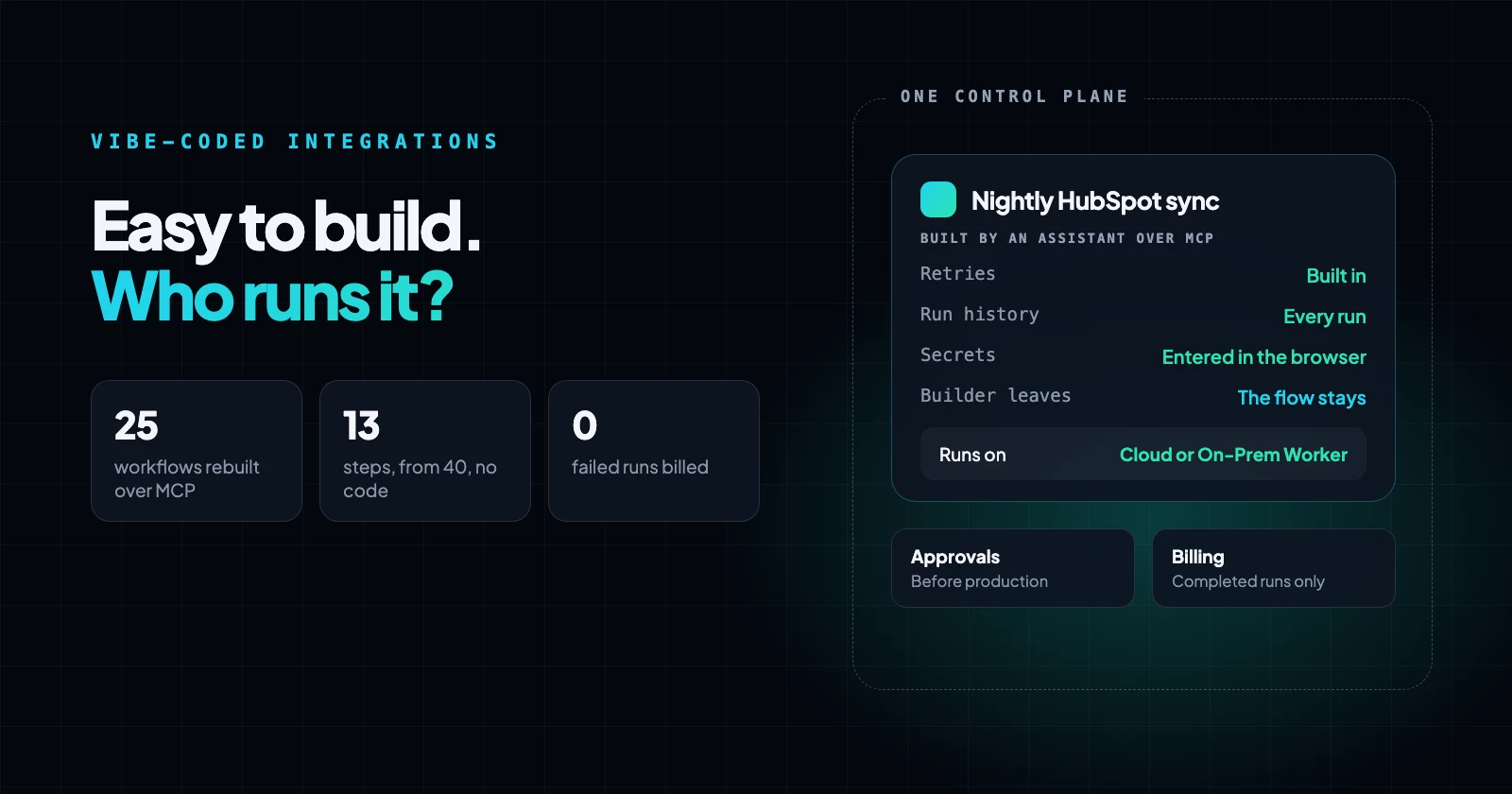
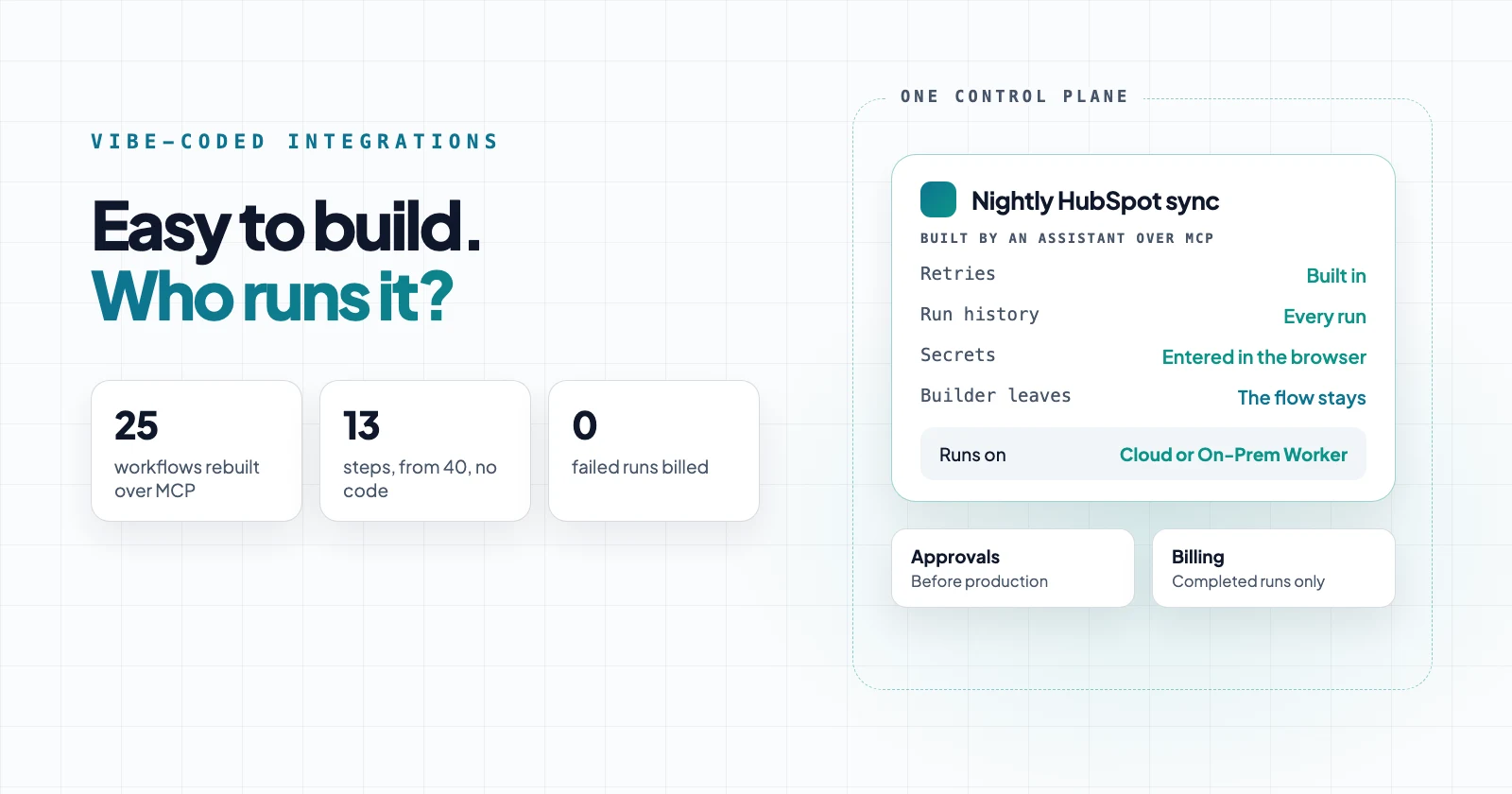
That raises an awkward question for anyone who sells an integration platform, including us. If an assistant can build the integration, what is the platform for?
This post is our answer. Headless iPaaS: what an AI assistant should and shouldn't do in your integration platform covered the build; this one covers everything after it, for integrations and the AI agents inside them.
Are integration platforms selling a builder or a runtime?
We think the value has moved to the runtime and the management layer around it. The builder still matters, but it's becoming the way in rather than the product.
Integration platforms used to compete on their visual builders, which mattered when a person had to click every step into place. Now a developer or ops lead describes the job to Claude Code or Cursor and gets working code, or a working flow, in minutes, and an agent SDK plus an assistant can get a tool-using agent answering requests in an afternoon.
When building is that cheap, the builder stops being the reason anyone picks a platform. Increasingly the builder is the customer's own assistant rather than the platform's canvas. The workflows themselves are getting cheap and short-lived too: as we show below, an assistant can rebuild one written in another tool.
What doesn't get easier is everything after the first run: where it runs, what happens when it fails, who can see and change it, how its secrets and actions are controlled, and who carries it forward when its author moves on. That's where the cost, the risk and the security exposure now sit, and it's what we've built Neblex around.
Why teams vibe-code integrations onto hosting platforms
Mostly cost and speed, and both are real. A scheduled function on a serverless hosting platform costs little or nothing at low volume, deploys from the same repository as the app, and needs no procurement.
Take a job we hear about often: every night, copy closed-won deals from HubSpot into the billing database. An assistant writes it in one sitting. It runs as a cron-triggered function, and on day one it works.
We don't think that's a mistake. It's a sensible first move for a team that needs one integration this week. The question is what happens on day ninety, when there are a dozen of these and the person who prompted them has moved on.
What a vibe-coded integration leaves you to build
Everything the code doesn't do explicitly. The hosting platforms are candid about this in their own documentation, which is worth reading before deploying an integration as a function.
Vercel's cron documentation, for example, says plainly that it "will not retry an invocation if a cron job fails", that delivery is "best effort" and a missed run leaves no log, and that the same scheduled run can occasionally be invoked more than once. It recommends locks and idempotent design so duplicates are safe. Its function limits cap a run at 300 seconds on the free plan and 800 seconds on paid plans (1,800 in a beta), with a 4.5 MB request and response body.
Here is what that leaves the nightly sync to build for itself:
| What an integration needs | What a scheduled function gives you | What you build and maintain |
|---|---|---|
| Retries after a failure | No automatic retry for scheduled runs | Retry logic, backoff, a dead-letter store |
| Protection from duplicate or overlapping runs | Possible duplicate and overlapping invocations | Locks and idempotent writes |
| Long or large jobs | Runs of 300 to 800 seconds (1,800 in a beta), 4.5 MB bodies | Batching, checkpoints, resume logic |
| Reaching a database in a private network or VPC | Runs in the provider's regions | A public endpoint or a private networking add-on |
| Run history and replay | Function logs | Per-record history and a way to rerun from the failure |
| Secrets | Environment variables per project | Rotation, and keeping keys out of prompts and commits |
| Knowing what exists and who owns it | One project per app | An inventory across every repository and account |
Two more gaps come from how the code is written. Veracode's 2025 GenAI Code Security Report found that AI-generated code introduced security flaws in 45% of cases, across 80 coding tasks and more than 100 models. GitGuardian's 2026 State of Secrets Sprawl found that commits made with Claude Code, an AI coding assistant, leaked secrets at 3.2%, against a 1.5% baseline across all public GitHub commits.
Both studies come from security vendors, but the point holds: code nobody reads carries risk nobody has checked. Keep the assistant, and stop making every integration its own small platform.
Why do AI agents make the runtime matter more?
Because an agent does everything a scheduled integration does, then adds a model that decides which tools to call. Every gap in the table above still applies, and three get sharper.
- Runs get longer and harder to predict. An agent loops through model calls and tool calls until it's done, which can outlast a function's time limit. One hosting platform now documents a separate durable setup for agent harnesses, with a queue and a log of every model and tool call, so a turn survives a crash or a timeout. It works, and it's one more system to wire up and own.
- A tool call is a write to a real system. Retrying a model call is cheap; retrying a refund or a CRM update is not. Each tool needs a rule for what happens when a run is interrupted mid-call.
- Someone has to say yes. OWASP names excessive functionality, permissions and autonomy as the causes of Excessive Agency, and recommends that a person approve high-impact actions before they're taken. In a hand-built agent, that approval step, its inbox and its timeout are yours to build.
Gartner predicts that over 40% of agentic AI projects will be canceled by the end of 2027, because of escalating costs, unclear business value or inadequate risk controls. Cost per run and the controls around each run are runtime questions, and they're cheaper to answer once than per agent.
What happens when the person who built it leaves?
Someone else inherits it, usually without warning and often without the context that made it make sense.
Picture the nightly HubSpot sync a year on. The ops lead who prompted it has left the company. Their successor finds:
- The code, in a repository they may not have access to, written by an assistant and possibly never read closely by anyone.
- No record of why it works the way it does. That reasoning lived in a chat history in the former employee's assistant account, and it left with them.
- The deployment and its secrets, possibly on a personal account with API keys issued to the person rather than the company. That can also break the host's terms: one major host's terms of service allow its free plan only for "personal or non-commercial use".
- Function logs for recent invocations, and nothing that says which records it wrote last month.
A team with a company repository, code review, tests and a shared hosting account can hand it over like any other code. But skipping that work is where much of vibe coding's speed comes from, and the risk grows with every integration and agent built that way.
Had the assistant built it as a flow on an integration platform, the successor would open the same workspace and find it there, with its connections, version history and every run, readable in the visual builder or through their own assistant over MCP. Only the builder's login leaves with them.
What is a distributed integration runtime?
A distributed integration runtime is an execution layer that runs integrations and AI agents wherever the data lives, in the vendor's cloud or in an environment you control, such as your own data center or a VPC in AWS, Azure or Google Cloud, while one control plane holds the definitions, secrets, schedules, run history and access rules for all of them.
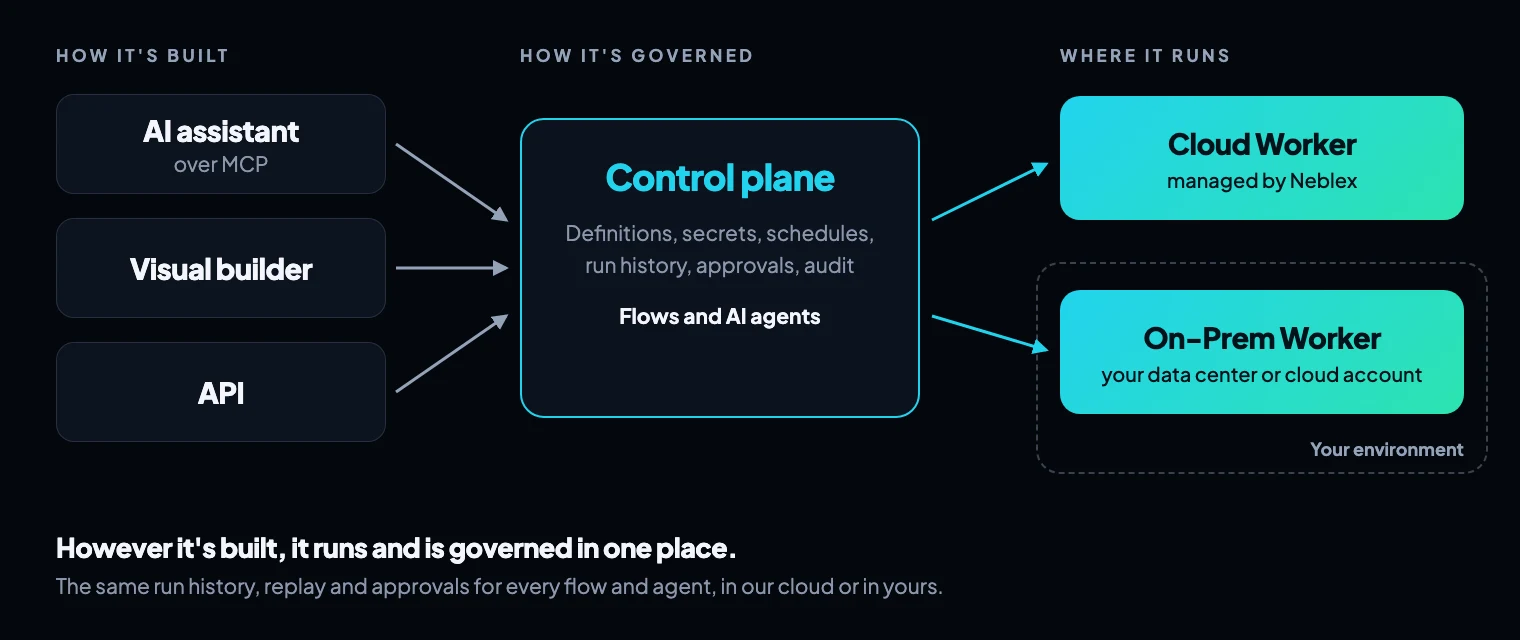
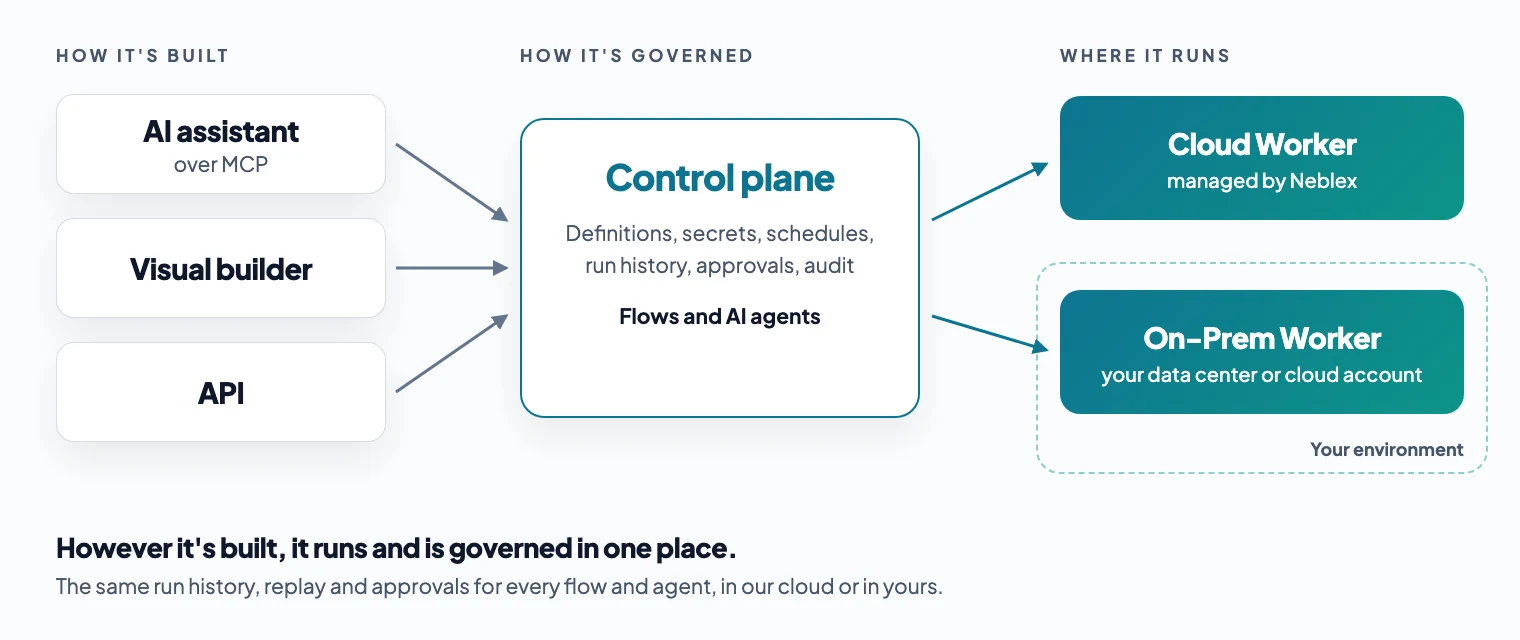
The control plane is where you decide, see and govern. The runtime is where the records move, next to the systems they touch, including a database or ERP behind a firewall.
Built as a flow instead of a hosted function, the nightly HubSpot sync gets its retry, duplicate check and batching from the runtime, and the run history shows which deals were written. If the billing database sits in your data center or your own cloud account, the flow runs on a runtime installed there; we covered what does and doesn't leave the network in On-prem runtime security: what leaves your network.
Run the whole agent, or just its tools, close to the data
A distributed runtime gives AI agents two ways to deploy, and a team can use both.
The whole agent on the runtime
The agent, its instructions and its tools live in the platform and run on the runtime, as a chat, a Slack or Teams bot, or a step in a flow. Its runs sit in the same history as your integrations, each reply shows which tools it used, and model calls go to your own AI provider account.
The agent where it is, its tools on the runtime
Your team may already have an agent, built with an agent SDK and running in their own app or on a hosting platform. It can stay there and call governed flows as its tools over MCP, using a key that can run the flows it was granted and can't create or publish anything.
Either way, each tool runs next to the system it touches: a tool that reads the ERP runs wherever the ERP sits, and one that updates the CRM runs in the cloud, so the agent never needs a path into your network. Each tool also brings its retries, error handling and audit with it, and can wait for a person's approval, so "a tool call is a write" is handled once instead of per agent.
Build with your assistant, run on one platform
Which tool builds an integration or agent should be the team's choice. Where it runs, and how it's governed once it does, should not vary by who built it or which tool they used.
In practice, a team using Neblex can build a flow from an AI assistant such as Claude Code, Cursor or Codex over the Neblex MCP server, in the visual builder, or through the API. Agents can be built from an assistant or in the visual builder, or by describing the agent in plain English.
In every case, the result is a Neblex flow or agent made from the platform's own steps and connectors. Neblex doesn't host code an assistant wrote for somewhere else; moving an existing integration, whether it's code or a workflow in another tool, means rebuilding the job as a flow, which the same assistant can do over MCP.
Whatever the route, flows and agents run on the same runtime, with the same run history, replay from the failed step, secrets entered by a person in the browser, and approval before anything reaches production. An agent's knowledge base indexes into a store you own and connect, such as PostgreSQL with pgvector or a vector database like Pinecone or Qdrant, never one Neblex keeps. The assistant builds quickly; the runtime makes sure what it built behaves when HubSpot times out at 2 a.m.
The runtime itself is the Neblex Worker, our distributed runtime engine: a single native program written in Rust that runs in our cloud or on infrastructure you control, from a server in your data center to a container in your own cloud account, connects outbound only, and stays small on the server.
Can an assistant move workflows from other integration tools?
Yes, by rebuilding them rather than importing them. We've done it 25 times, with an assistant connected to Neblex over MCP doing most of the work: a scheduled TypeScript function, 11 workflows from one automation platform's public template library, 8 published samples and templates from another integration platform, and 5 exports that teams built in a third platform and posted publicly, the largest with 40 steps. Each became a flow made of the platform's own steps and connectors.
Together they cover webhooks and schedules, branching, loops, error handling, paging, human approvals and AI steps, with AI in 7 of them. We ran every one, and tested most of them on failure cases as well: bad input, a missing record, a declined card, a vendor error, a slot someone else had just booked.
Fewer steps, and almost no code
We asked for two things at once: as few steps as possible, without falling back on code to get there. Several originals kept their logic in JavaScript or Python code steps. Only one of the 25 rebuilt flows needed a code step for its own logic, a few lines that join AI summaries into one prompt. Hand-written paging became the platform's built-in pagination and retry, and checks written in code became its own steps for normalizing, deduplicating, filtering and summarizing records.
The first rebuilds were correct but long, so the assistant took a second pass to cut steps. The 40-step workflow, which turns a job description into a tailored resume, cover letter and outreach email, became 13 steps with no code. It now asks the model once for every field by name, where the original joined two AI replies, split them on a marker and stored a dozen values one step at a time. Across the five posted exports, 69 steps became 53. Step count matters beyond tidiness: on platforms that bill per step or task executed, every extra step is paid for on every run.
What the rebuilds found in the originals
It wasn't one click. Each flow took a few rounds, with the assistant fixing whatever the last run reported. Reading every step closely enough to rebuild it also showed how rough published workflows can be. These were public templates and shared exports, the kind people copy as a starting point, and several had plainly never been run end to end:
- A hotel checkout whose guest check was inverted, so it turned away every existing guest, and which reported a failed CRM update back as a success.
- A booking flow that could book the same slot twice. In our rebuild, a unique key on the slot turned the second request away.
- The 40-step workflow read AI output by position, so one missing heading would put every field in the wrong place in the documents it generated.
Others were smaller: a contact lookup that could never match anyone, comments posted as raw HTML, a branch that was never connected, and an AI prompt that told a model without web access to "validate it using Google searches".
That's the argument of this post in miniature. A workflow that's quick to write and never run has the same problem as a vibe-coded integration. And if an assistant can rebuild it in another tool, shorter, the workflow definition is no longer what you're paying for, or what keeps you on a platform. What's hard to rebuild is everything around it: a runtime that logs every run and reports every failure, the connections, the approvals, and a place where the next person can pick it up.
How should integration platforms charge when building is cheap?
For completed work. Modern platforms price on a few common units: active workflows, connectors, steps or tasks executed, workflow runs, or transactions. Once an assistant does the building, some of those units start to work against the customer.
- Per workflow: AI makes it cheap to build many small, single-purpose workflows, which is often the cleaner design. Counting workflows charges for the thing that just got cheap.
- Per step, task, or credit: a careful flow has validation, deduplication and error-handling steps, and an agent decides at run time how many tool calls it needs. Counting steps makes the careful version cost more and the agent's bill hard to predict.
- Per run or execution: the closest to value delivered, as long as a run that fails doesn't count.
That's the model we chose: Neblex charges per completed execution, and failed runs don't bill. Every core feature is on every plan. Details are on our pricing page.
When a function on a hosting platform is the right call
Sometimes, and we'd rather say so. A single low-stakes job that writes nowhere important, run by the person who wrote it, is fine as a scheduled function. So is a prototype, or an agent demo, that you expect to throw away.
The signs it's time to rebuild it on an integration platform:
- If it stopped running tomorrow, revenue, customer service or another part of the business would feel it.
- An agent can take an action a person should approve first.
- Someone other than its builder needs to see, change or audit what it did.
- You need to manage state or have begun writing retry, data quality, or idempotency logic.
The takeaway
Building integrations and agents is no longer the hard part, and as workflows become easy to rebuild from one tool to another, we don't think building is what you should be paying for. Let your team build with whatever gets the job done, including an AI assistant working directly on the platform.
Then ask of every integration and agent that matters: where does it run, who can see what it did, and who carries it forward if its builder leaves? If the answer differs for each one, the money saved building vibe-coded integrations and agents is coming back as operational risk.
Sources
- Managing Cron Jobs, Vercel documentation, updated August 11, 2026
- Functions Limits, Vercel documentation, updated August 24, 2026
- Running Agent Harnesses Durably, Vercel documentation
- Terms of Service, Vercel, updated October 19, 2026
- 2025 GenAI Code Security Report, Veracode, July 30, 2025
- The State of Secrets Sprawl 2026, GitGuardian, March 17, 2026
- LLM06:2025 Excessive Agency, OWASP Top 10 for LLM Applications, OWASP Foundation, 2025
- Gartner Predicts Over 40% of Agentic AI Projects Will Be Canceled by End of 2027, Gartner, June 25, 2025
Last checked: November 16, 2026.
Frequently asked questions
What are vibe-coded integrations?
They are integrations written by prompting an AI coding assistant and deployed as your own code, often as scheduled or webhook functions on a hosting platform. The assistant writes the logic; you own everything about how it runs. AI agents built with an agent SDK are often shipped the same way.
What happens to vibe-coded integrations when the person who built them leaves?
Someone else inherits code they didn't write, often without the chat history that explained it, sometimes on a personal hosting account with secrets tied to the former employee. A team with a company repository, code review, tests and a runbook can hand it over like any other code. Without those, the usual outcome is a rebuild.
Where should AI agents run in production?
Either run the whole agent on a governed runtime, or keep the agent where it already runs and deploy its tools as flows on a runtime next to the systems they touch. Either way you want a record of every run and tool call, recovery after a failure, tools limited to what the agent needs, and a person's approval before high-impact actions.
Can I move workflows from another integration platform to Neblex?
Yes, by rebuilding them as Neblex flows rather than importing them. An AI assistant connected over MCP can read the existing workflow or code and rebuild it from the platform's own steps and connectors, then fix whatever its runs report. Expect a few rounds per workflow, and set up each connection again, since credentials don't carry over. Across the 25 workflows we've rebuilt this way, a 40-step one came out at 13 steps with no code.
Bring us the product or the integration that hurts most
We will build it with you, on your data, with the run log open.