Headless iPaaS: what an AI assistant should and shouldn't do in your integration platform
By Daniel Wiegand, Owner & Founder
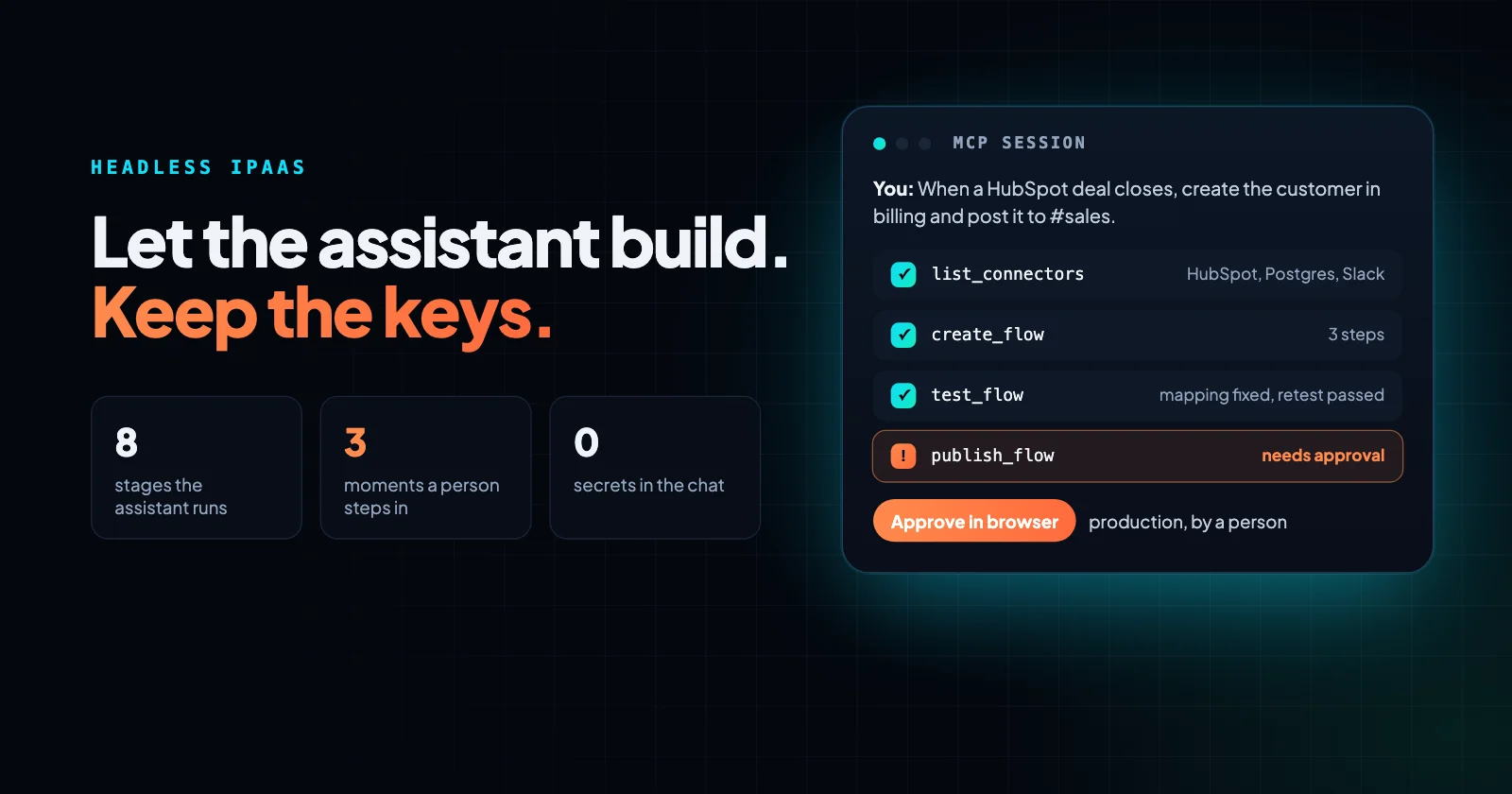
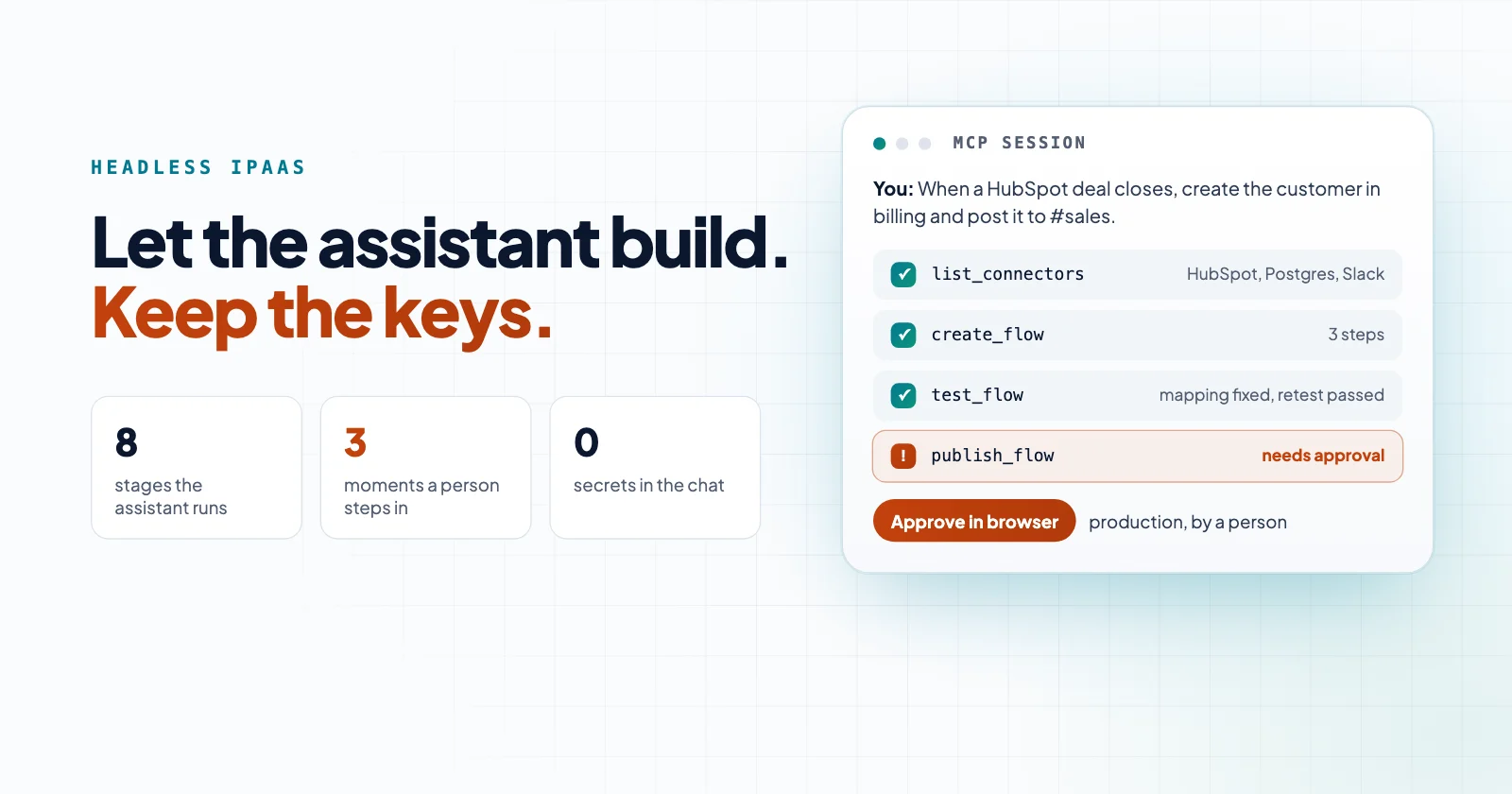
The term is new, and vendors use it for very different things. Some let an assistant run a workflow somebody else built. Others let it build the whole integration and push it to production.
This post compares the designs by what an assistant can actually do at each stage of an integration's life, and what should still need a person. At the end you'll find ten questions to put to any vendor.
What is a headless iPaaS?
An integration platform whose capabilities don't depend on its screens.
The term comes from content management. A headless CMS is a back end that stores content and serves it through an API, with no display layer of its own. Applied to an iPaaS (integration platform as a service), it means anything you can do in the visual builder, you can also do through an API.
What changed in the last year is who calls that API. The Model Context Protocol (MCP), an open standard for connecting AI applications to outside systems, is now supported by Claude, ChatGPT, VS Code, Cursor and others. A platform with an MCP server can be driven from the same assistant your developers already use to write code.
How useful that is depends on what the server exposes.
Three ways a platform can work with an AI assistant
You'll run into three designs, and they differ in how much of the job the assistant can finish.
Let's use one job as the running example, with the same CRM as our HubSpot contacts post. In Claude Code you type: "When a HubSpot deal closes, create the customer in our billing database and post the deal to the #sales Slack channel."
Assistant inside the visual builder
The platform ships its own assistant on the canvas. It turns your sentence into draft steps: a HubSpot trigger, a database insert, a Slack message. Then a person checks the mapping, saves, tests and publishes in the browser.
That works well for people who live in the builder. But you can't use it from the coding assistant you already have open, and it stops at the draft.
Action-only MCP server
The platform exposes actions, or workflows that already exist, as tools. Your assistant can post to Slack or kick off a workflow someone already built, but it can't create or change one.
In our example, the assistant could send a test Slack message. Somebody still has to build the integration itself in the builder.
Full-lifecycle headless platform
The platform exposes the same capabilities its visual builder uses. Your assistant lists the connectors and the connections you already have, reads the HubSpot and database operations, writes the workflow, validates it, tests it on a sample deal, reads the result, fixes the mapping and asks to publish.
A person still steps in at a few deliberate points, covered below. Everything else happens in one conversation, and the result opens in the visual builder like anything else.
What an assistant needs at each stage of the integration lifecycle
Building is one stage of many. An integration gets discovered, built, tested, published, run, debugged and eventually retired. An assistant that only covers the first two leaves the rest to a person.
| Stage | What the assistant needs | In-builder assistant | Action-only MCP | Full-lifecycle headless |
|---|---|---|---|---|
| Discover | List connectors, their operations and schemas, and existing connections | Within the canvas | Only the exposed actions | Yes |
| Build | Create and edit the workflow definition | Draft only | No | Yes |
| Validate | Check the definition before saving | When a person saves | No | Yes |
| Test | Run on sample data without publishing, and read step results | A person runs it | No | Yes |
| Publish | Make it live, with approval where required | A person | No | Yes, with approval for protected environments |
| Run and observe | Start runs, read run history and step events | Varies | Trigger only | Yes |
| Debug | Read the failed step's input and error, fix, re-test | Varies | No | Yes |
| Retire | Unpublish, delete to a trash, restore | A person | No | Yes |
In our example, the problems show up during testing. A deal without a company attached, or a currency the billing table won't accept, shows up in the test run's step events. An assistant that can read those events fixes the mapping and tests again in the same conversation.
One that can't hands you an error message to chase. And after a failed production run, those same events tell you which step to re-run from. We covered why that matters in Replay from the failed step, not from record one.
Guardrails: what should still need a person
Handing an assistant write access to the system that moves your customer data is not a small decision. Keep the high-impact steps with a person.
The standards agree. The MCP specification says there "SHOULD always be a human in the loop with the ability to deny tool invocations," and that servers must implement proper access controls.
OWASP lists "excessive agency" among the top risks for LLM applications: too much functionality, too many permissions or too much autonomy. Its fix is least privilege plus human approval for high-impact actions.
For an integration platform, that comes down to five things:
- Secrets stay with a person. The assistant can create a connection, but a person enters the API key or completes the OAuth sign-in in the browser. The secret never passes through the conversation.
- Building needs a strong sign-in. Authoring and publishing should require a person's sign-in with a second factor, not a long-lived API key sitting in a config file. A key can be allowed to run workflows. It shouldn't be able to change them.
- Access is scoped. Whoever grants access picks the projects and environments the assistant can reach, and what it may do there: operate, author or publish. Revoking it takes effect immediately.
- Production publishes wait for approval. The assistant can build and test freely in a development environment. Publishing to production waits until a person approves it in the browser.
- Everything is reversible and logged. An edit that collides with someone else's is rejected instead of overwriting it, deletes go to a trash you can restore from, and every run leaves events you can read, with secrets scrubbed.
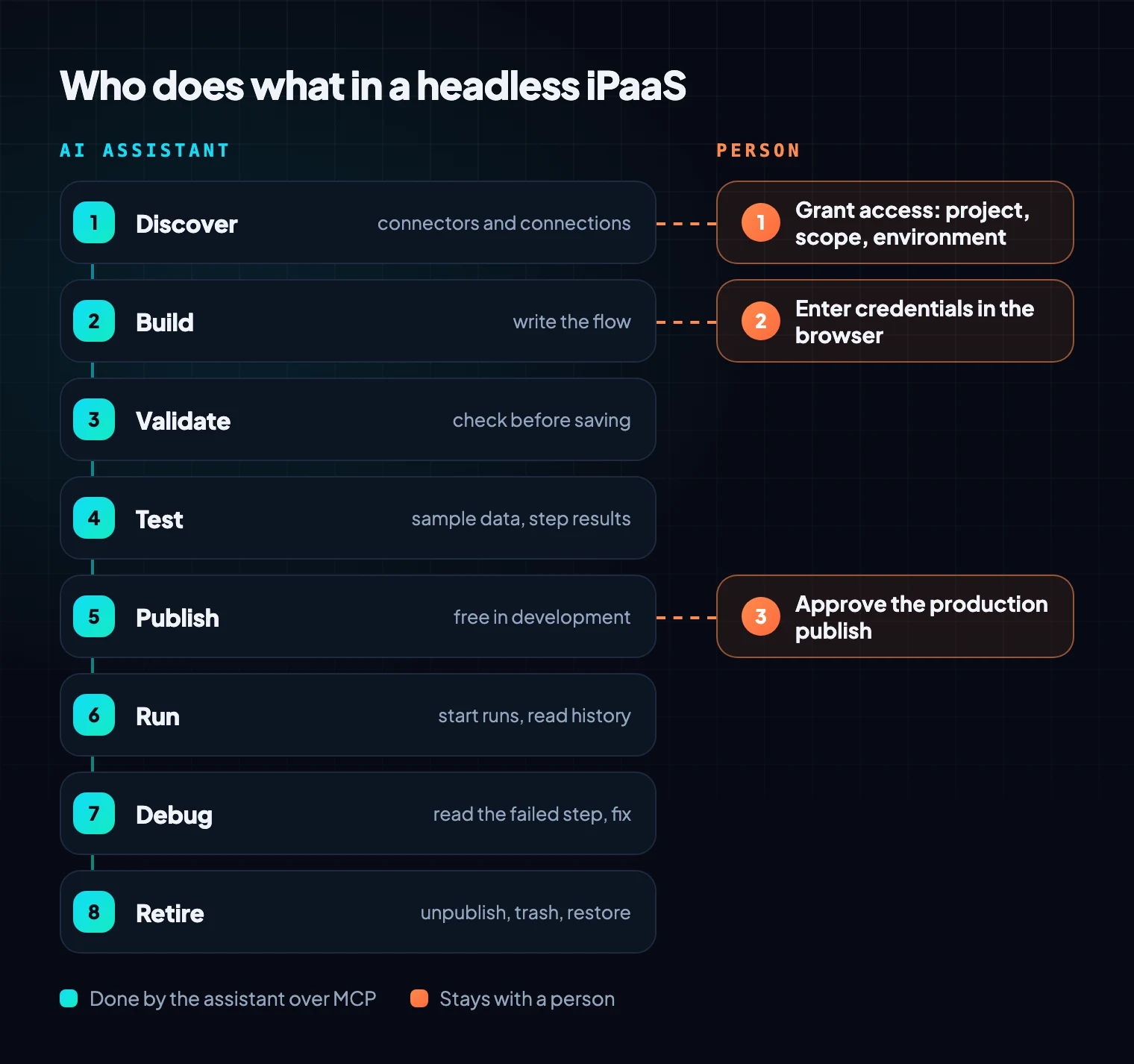
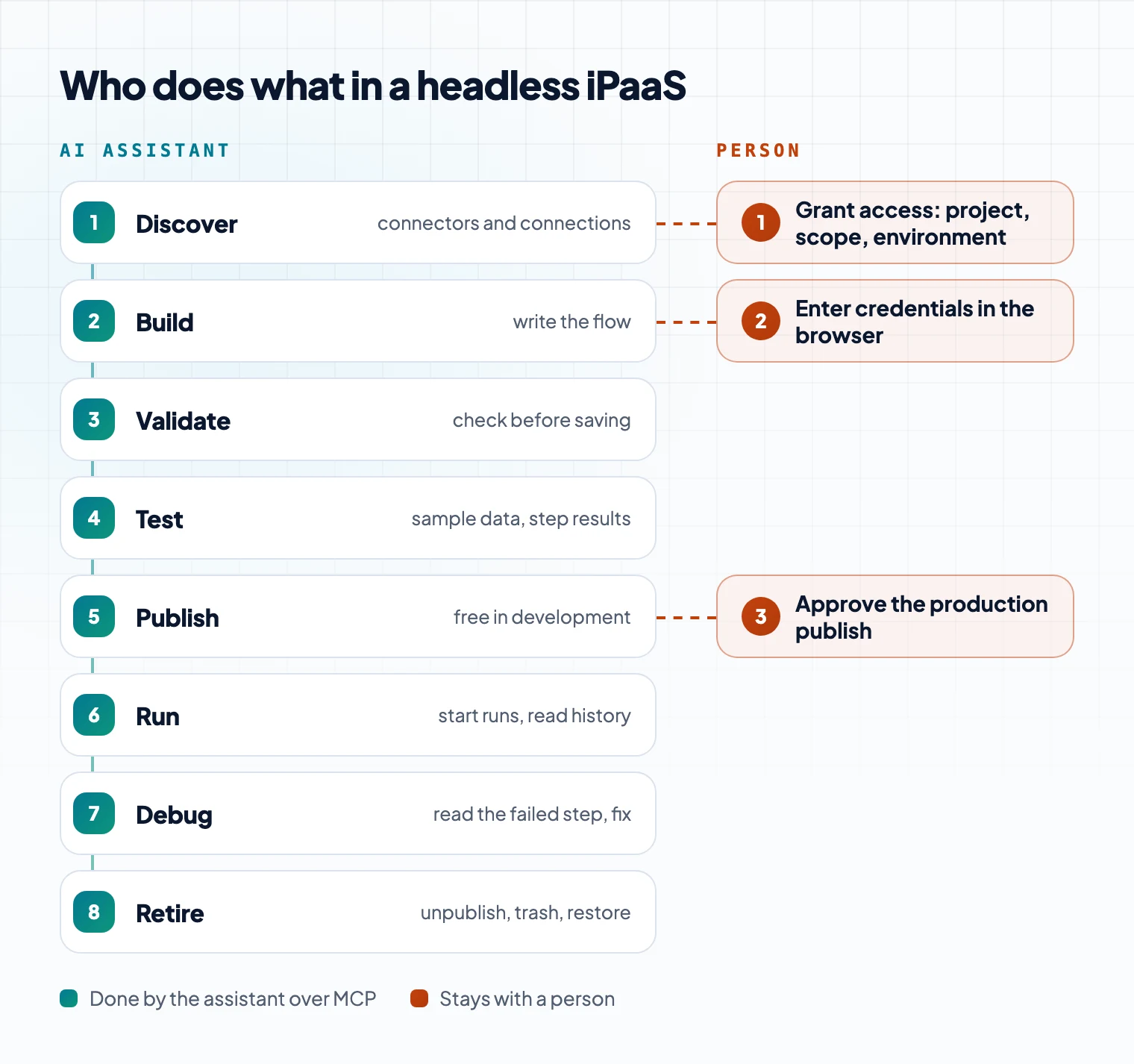
None of this stops the assistant from doing the work. In our example, a person steps in exactly three times: to grant access, to enter the HubSpot and database credentials, and to approve the production publish.
Common mistakes when evaluating AI access
Most of them come from treating "it has an MCP server" as the answer.
- Only checking the build. A demo that turns a sentence into a workflow is the easy part. Ask to see the assistant test it, read a failed step and fix it.
- Letting the assistant hold the keys. If connecting a system means pasting its API key into the chat or a config file, that key now lives in the assistant's context and logs.
- Using one environment. If the assistant builds where production runs, every test writes real records. Keep development, test and production separate, and gate the last one.
- Granting everything. A grant that covers every project and every permission is exactly the "excessive permissions" OWASP warns about. Start with one project and the author scope.
- Assuming the visual builder goes away. It shouldn't. Somebody will review the assistant's work, and most people do that in the builder.
Questions to ask before you let an AI assistant build in your integration platform
They work with any vendor, and the answers tell you which design you're really getting.
- Can the assistant create and edit integrations, or only run existing ones?
- Does it have the same capabilities as the visual builder, or a subset? Which parts are missing?
- Can it test an integration without publishing it, and read each step's input, output and error?
- Can it read run history and debug a failed run?
- How are credentials entered? Does a secret ever pass through the assistant?
- What sign-in does building and publishing require? What can a plain API key do?
- How is access scoped: by project, by environment, by action?
- What needs a person's approval, and where does that approval happen?
- What happens when the assistant and a colleague edit the same integration at the same time?
- Can deletes be undone, and is every change and run logged?
What this means for IT and security
Treat the assistant as its own user with its own grant, not as an extension of the developer's account.
Give it one project in a development environment, the author scope, and no publish rights to production. Then watch what it asks a person for. A well-built platform sends you a browser link for every credential and every production publish, and for nothing else.
Where Neblex fits
Neblex Integration Fabric is a full-lifecycle headless platform. The visual builder and the MCP server work with the same building blocks, so an assistant connected to Neblex can do what a person does in the builder, under the same rules.
- Any MCP client can connect, including Claude Code, Codex, Cursor, VS Code and Windsurf.
- The assistant works across flows, forms, apps, data tables, transform modules, data models, AI agents and connections, not just workflows.
- It discovers connectors and their operations, validates before saving, tests before publishing, runs flows, reads secret-scrubbed run events and checks flow health.
- Secrets never go through MCP. Creating a connection returns a link where a person enters them.
- Building and publishing require a user-approved sign-in with a second factor. A static API key can inspect and run the flows it's granted, and can never create or publish.
- On the consent screen, the person picks the scopes (operate, author, publish), the projects or flows, and the environment. Revoking access cuts it off immediately.
- Publishing into a protected environment waits for a person's approval in the browser.
- An edit that collides with someone else's is rejected, so the assistant re-reads and re-applies its change instead of overwriting. Deletes go to a trash, and a restore re-checks dependencies.
Two things stay in the browser on purpose: entering secrets, and promoting work between environments. That's how we build and test our own flows: from Claude Code, in a development environment, then promoted to production in the GUI.
So before your team connects an AI assistant to its integration platform, find out two things. Can it test and debug as well as build? And which steps still go to a person? Those answers tell you whether a headless iPaaS will speed up your integration work or just move the risk somewhere else.
Sources
- Headless content management system, Wikipedia
- What is the Model Context Protocol (MCP)?, modelcontextprotocol.io
- MCP specification: Tools (2025-06-18), modelcontextprotocol.io
- LLM06:2025 Excessive Agency, OWASP Top 10 for LLM Applications, OWASP Foundation, 2025
- MCP guide, Neblex Integration Fabric docs
Last checked: October 15, 2026.
Frequently asked questions
What is a headless iPaaS?
An integration platform you can fully use without its visual interface, through an API, a command line, or an AI assistant connected over MCP. The visual builder usually stays; it just stops being the only way in.
Can an AI assistant like Claude Code build integrations in an iPaaS?
Yes, if the platform exposes building and not just running. Check that the assistant can discover connectors, create and validate a workflow, test it and read the run results. Some platforms only let an assistant trigger existing workflows.
Is it safe to give an AI assistant write access to an integration platform?
It can be, if the platform limits what the assistant can reach and keeps the high-impact steps with a person. Look for access scoped per project, a strong sign-in for building, secrets entered by a person, approval before publishing to production, and a full run log.
What's the difference between an iPaaS MCP server and a headless iPaaS?
The MCP server is the connection. What matters is what it exposes. Some only let an assistant run existing actions or workflows. A headless iPaaS exposes the same capabilities as the visual interface, so an assistant can build, test, publish and debug.
Does a headless iPaaS replace the visual builder?
No. An assistant can build an integration that you then open, review and change in the visual builder. Headless adds a way in. It doesn't take one away.
Bring us the product or the integration that hurts most
We will build it with you, on your data, with the run log open.