Deduplicate customer records with AI: let rules do 99% of the work
By Maria Soria, Manager of Customer Success
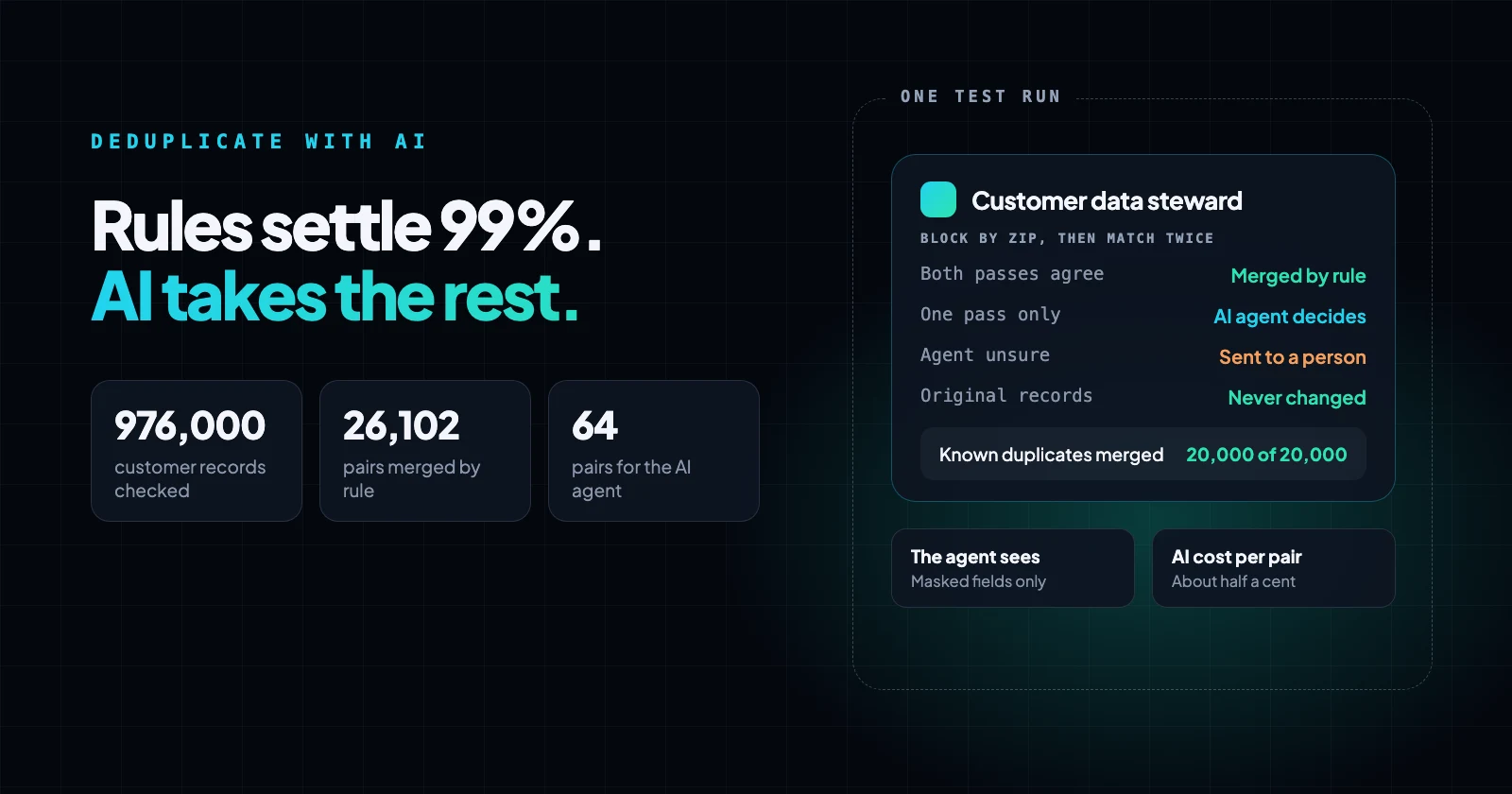
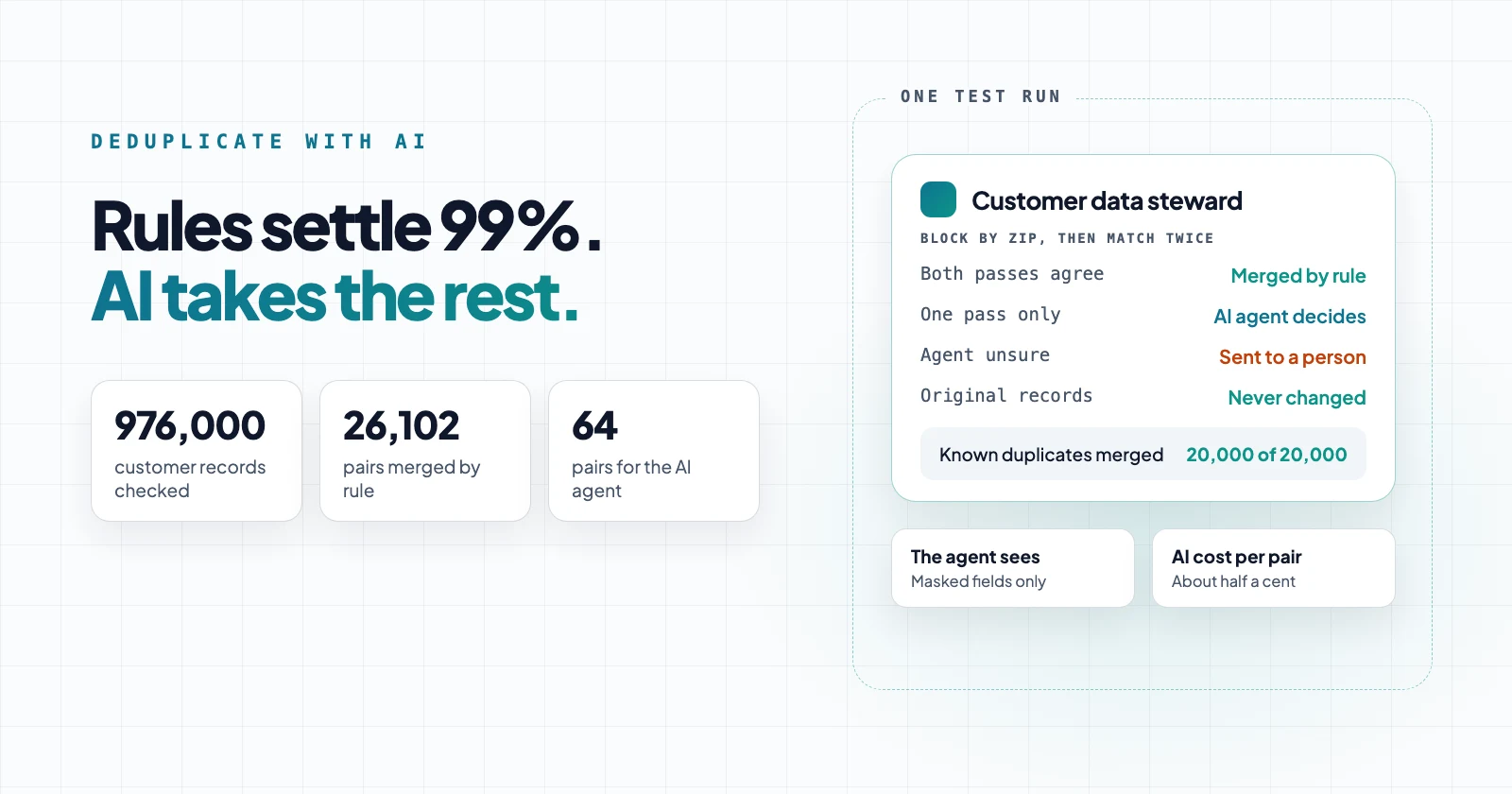
That is the setup we tested on 1 million customer records. Two matching passes settled 26,102 of 26,166 candidate pairs, more than 99%.
The AI agent reviewed the other 64 and settled all of them, so no pair needed a person. No original record was changed.
A request we hear often
Teams with a customer table in their own database ask us how to clean out duplicates without hand-reviewing thousands of pairs, and without sending their customer list to an AI model. This guide walks through the design we built for that, step by step, with the numbers from our test.
The test data: 1,000,000 customers in an on-prem PostgreSQL database, of which 976,000 passed four basic data-quality checks.
We knew which 20,000 of them were duplicates, with typos such as "Dnoald" and nicknames such as Mike for Michael, so we could check every merge.
Why not deduplicate customer records with AI alone?
Because the number of pairs grows with the square of the number of records. A deduplication run compares each record with every other record, so 1 million records make about 500 billion pairs. Even at a fraction of a cent per pair, that is far too many to send to a model.
A model is also the wrong tool for the easy cases. "Jon Smith" and "John Smith" at the same address with the same phone don't need judgment.
They need a rule that runs in milliseconds and gives the same answer every time. Use the model only on the pairs where the rules disagree.
Deterministic, probabilistic and AI matching: what each does
Each kind of matching covers a gap the others leave. That is the core of probabilistic data quality in practice: exact rules where a rule can decide, scores where it can't, and judgment only where the scores are unclear.
| Approach | How it decides | Examples | Good at | Misses |
|---|---|---|---|---|
| Deterministic | Exact match after normalizing | Same email, same phone digits | Fast, repeatable, easy to explain | Typos, nicknames, anything it wasn't normalized for |
| Probabilistic (fuzzy) | A similarity score against a threshold | Jaro-Winkler, edit distance (Levenshtein), Soundex | Typos and spelling variants | Pairs near the threshold; a household versus one person |
| AI | Reads the pair and judges what it means | A model with fixed instructions | Nicknames, context, conflicting signals | Too slow and costly for every pair |
Strictly, record-linkage research uses "probabilistic" for models that weight each field by how often its values occur. In practice, the term covers any scored match, and that is how we use it here.
This guide uses them in that order. Rules and scores settle the volume, the AI agent sees only the pairs they disagree on, and a person sees only what the agent isn't sure about.
Step 1: block, then run probabilistic (fuzzy) matching within each block
Blocking means comparing only records that share a key, such as a zip code. It is the standard way record linkage keeps the work manageable. In our data, zip code split 976,000 records into about 100,000 blocks of around 10 records each, which cut the work from about 476 billion comparisons to about 4.7 million.
Choose a key that duplicates almost always share. Zip worked here because the duplicates in our test kept their address. A name is usually a poor key: common names are shared by many unrelated people, and a typo puts a duplicate in a different block.
Jaro-Winkler, edit distance or Soundex?
Three common fuzzy methods suit different fields:
- Jaro-Winkler is a string similarity score that gives more weight to strings that match from the beginning, which suits names, where typos tend to come later in the word.
- Edit distance (Levenshtein) counts the single-character insertions, deletions and substitutions that turn one string into the other. It suits codes such as account numbers or SKUs, where a typo can sit at any position.
- Soundex turns a name into a four-character sound code, so Smith and Smyth both become S530, and records match when the codes are identical. It never matches across first letters (Catherine is C365, Katherine is K365), and it was designed for English surnames. Use it as an extra signal or a blocking key rather than on its own.
We used Jaro-Winkler, scoring street and name together, and treated 0.9 or above as a candidate match. Edit distance and Soundex are options in the same step; we didn't use them in this test.
Three practical lessons from running the fuzzy pass:
- Normalize first. Lower-case names and streets, trim emails, reduce phone numbers to digits, and split the house number from the street name.
- Keep each comparison batch small. The fuzzy step compares each record with the ones it has already kept, so its cost grows with the square of the batch: 0.9 seconds for 1,000 records, about 67 seconds for 10,000. We cut work into units of about 1,000 records, along zip boundaries.
- Check the result within blocks. A long, similar street name ("8438 Martin Luther King Jr Blvd" and "8439 Martin Luther King Jr Way") can pull a record into the wrong group. Splitting each group by zip afterwards removed those links.
Step 2: add a deterministic pass, and merge only where both agree
The second, deterministic pass pairs records in the same zip that have the same normalized email or the same phone number. It is cheap, and it catches what fuzzy matching misses, such as a nickname that changes the first name too much.
Normalize before comparing. In our first attempt we compared raw values, and phone numbers that differed only in formatting looked different. After reducing phones to digits, all 20,000 known duplicate pairs shared a phone number.
Then route each candidate pair:
| Found by | Pairs | Action |
|---|---|---|
| Both passes | 26,102 | Merge by rule, no AI call |
| One pass only | 64 | Queue for the AI agent |
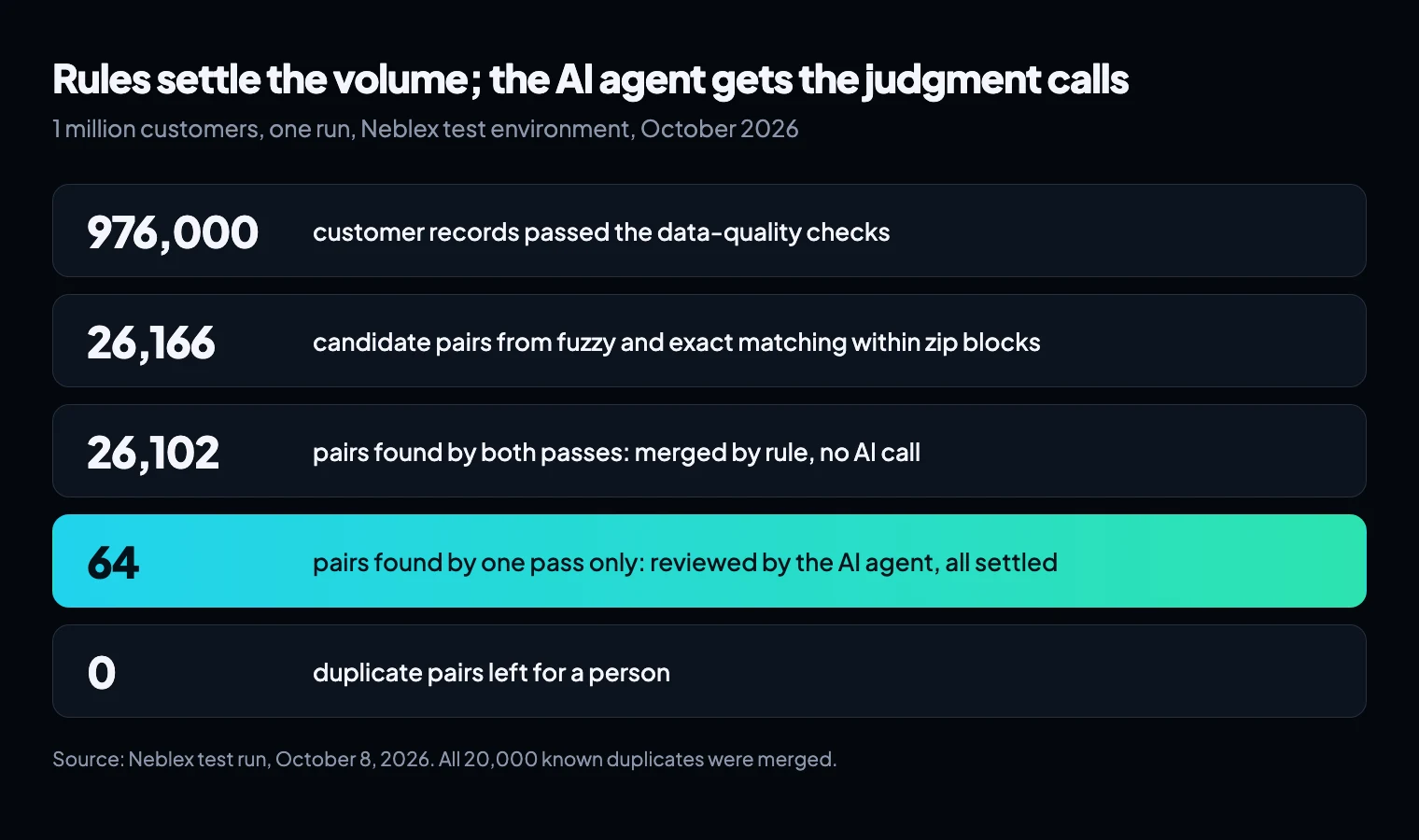
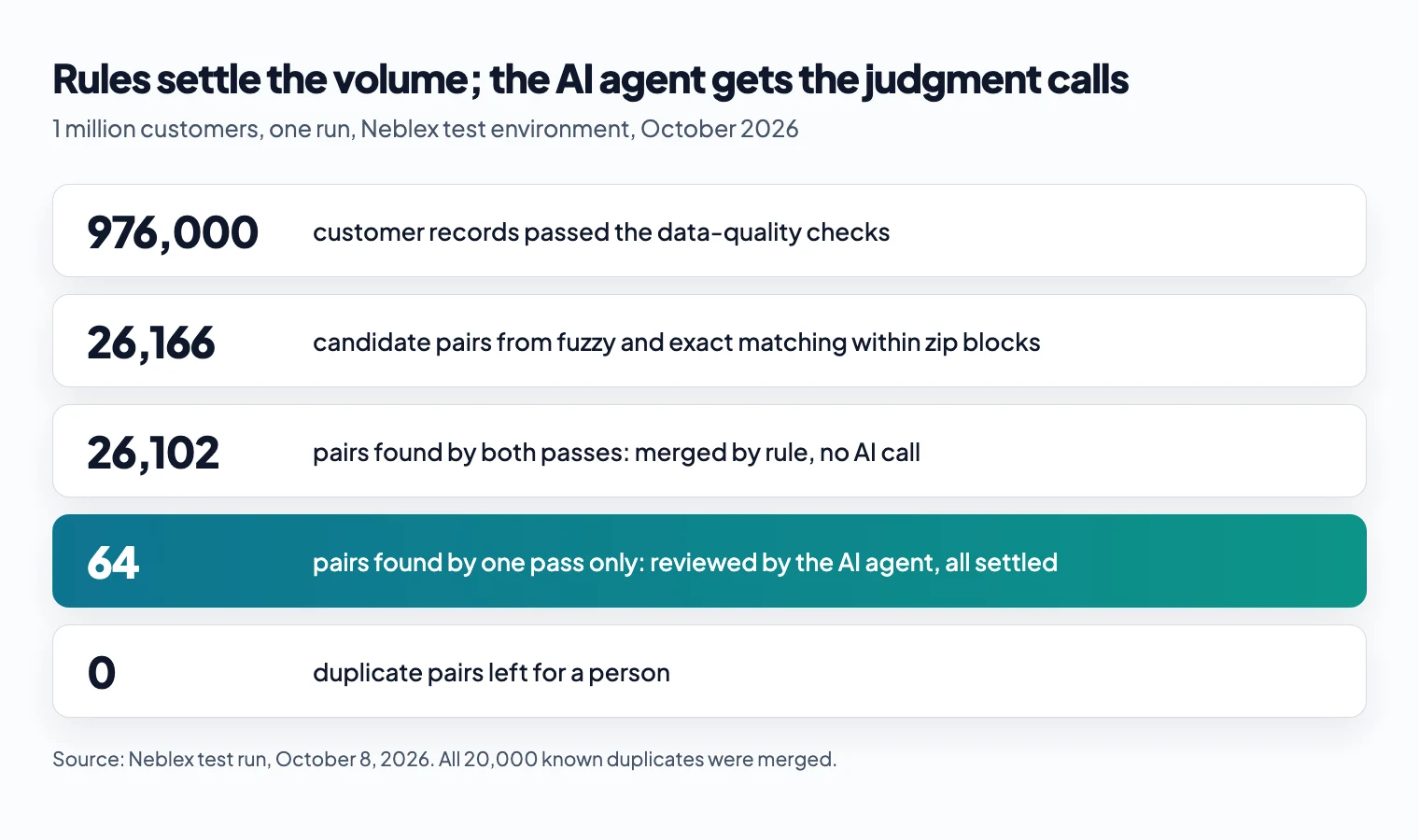
Every pair that both passes found was a duplicate: the 20,000 known pairs, plus copies of existing customers with only the email changed. The 49 non-duplicates in the run were all in the one-pass group.
Step 3: let an AI agent settle the rest, from masked data
An AI agent here is a model with fixed instructions that reviews one pair at a time and returns a structured decision. Ours used Claude and returned a verdict, the record to keep, the merged name and company, a confidence score, any conflicting fields and a one-line reason.
The agent never saw a street address, a full email or a full phone number. Those comparisons ran on the runtime inside the network, and the agent received the result as flags. Hashing would not have been enough on its own: a hashed email is still personal data.
| Field | Sent to the agent as |
|---|---|
| Name, company, city, state | As stored |
| Domain, plus "same email: yes/no" | |
| Phone | Last 4 digits, plus "same phone: yes/no" |
| Street address | "Same house number", "same street name", "same zip" flags |
The instructions covered the cases a similarity score gets wrong: two different first names at one address are two people, and a shared phone with a different name is a conflict, not a merge.
Two settings mattered more than the prompt:
- Confidence means "how sure am I of my verdict", not "how likely is a duplicate". Before we said so, the agent gave a correct rejection a confidence of 0.05.
- Use different thresholds for merging and dismissing. A merge changes data; a dismissal doesn't. We merged automatically at 0.9 or above and dismissed at 0.8 or above. With a single 0.9 threshold for both, 36 correct rejections had gone to a person for no reason.
Across our test runs the agent reviewed 72 pairs and decided all of them correctly, at about 2 seconds each. Read that as a best case: we refined the instructions on these same pairs (the two settings above came from that), and 72 pairs is a small sample. Score the agent on pairs it has never seen before you trust it with yours.
What each call costs, and how token use is capped
Each review used about 1,900 tokens in total, most of them the instructions and the case. At Claude Sonnet 5's list price of $2 per million input tokens and $10 per million output tokens, that comes to roughly half a cent per pair, or about 30 to 50 cents for all 64 pairs.
A model that loops or keeps generating can run up an unexpected bill. Three limits rule that out:
- Each call is a single step with no tools, so there is no loop.
- Each call has a budget of 3,000 tokens, and the platform limits how long a single reply can be, so even the worst case stays under 2 cents.
- Each scheduled run reviews at most 500 cases. The cap is a setting you can change without editing a flow.
On a scheduled re-run, pairs that were already decided are skipped, so the agent is only called for new pairs. In our full run, that meant 7 calls.
Step 4: a person for the rest, and an audit trail that never changes your records
Anything below the thresholds becomes a review task for a data steward, a person responsible for the quality of the customer data. The task shows the two masked records and the agent's proposal, and the steward chooses: merge as proposed, merge but keep a different record, or keep them separate. In our run the agent settled every duplicate pair, so we tested this step with one deliberately unknown case, which the agent correctly handed to a person.
Keep every original record. We wrote three things instead:
- An append-only decision log: every decision, with the inputs it was based on, the agent version or the person who made it, and the reason. A database trigger blocks edits and deletes. A person's decision is a new row that points to the agent's.
- A golden record per merged customer: the surviving values in a separate table. Our survivorship rule kept the oldest record and the correctly spelled name.
- A pointer on each duplicate to the record it merged into.
Reports and downstream systems read the golden record. Anyone auditing a merge reads the log.
What we measured
| Measure | Result |
|---|---|
| Records checked | 976,000 |
| On-prem matching and routing time | 28 minutes on one runtime, about one CPU core, 947 MB peak memory (resident size) |
| Known duplicates merged | 20,000 of 20,000 |
| Pairs settled by rule | 26,102 of 26,166 |
| Pairs reviewed by the AI agent | 64, all settled (72 distinct pairs across all test runs, all correct, on pairs the instructions were refined on) |
| AI cost per pair | Roughly half a cent at list price; each call has a 3,000-token budget |
| Duplicate pairs sent to a person | 0 |
| Original records changed | None |
The data was masked before it left the network, as in our earlier test on the same kind of test data. The matching ran on a runtime inside the network, whose resource use we measured separately.
What can go wrong
Most failures fall into two kinds: missed duplicates, which leave clutter, and false merges, which combine two real customers. A false merge is the worse one, so set your thresholds to avoid it first.
- Duplicates fall outside the block. Records are only compared within a block, so a customer who moved won't be paired with their old record under zip blocking. Run a second pass blocked on a different key, such as phone or email.
- Two people look like one. A parent and child with the same name at one address, or a couple sharing a phone and email, score high on similarity. Tell the agent how to treat them, and send them to a person when it's unsure.
- Merges chain together. If A matches B and B matches C, a pair-by-pair merge joins all three even when A and C share little. Group linked pairs into one cluster and check that every record in it belongs before you merge.
- Re-runs find different pairs. Fuzzy matching compares each record with those it kept earlier, so a different batch order can surface different borderline pairs. Give each pair a stable id built from its two record ids, and skip pairs already decided.
- The model changes. A new model version can judge the same pair differently. Pin the version your flows use, and re-score a set of decided pairs before you switch.
Real duplicates are messier than the ones in our test. Run the steward on a sample of your own records, with a person checking a few hundred decisions, before you lower any threshold.
How we built it in Neblex
The steward runs as a set of Neblex flows. Pre-processing, matching and routing run as reusable sub-flows on the Neblex Worker, the runtime inside your network, so raw customer data stays there. The fuzzy pass uses the built-in "Remove duplicates" step with Jaro-Winkler. The built-in "Mask personal data" step can hide, remove or hash emails, phone numbers and ID numbers before a record leaves the runtime, and its hashing gives the same value the same hash, so records still match.
A scheduled cloud flow sends queued pairs to one AI agent, the DQ Exception Steward, and a second scheduled flow turns the cases it can't settle into Neblex Form tasks. The thresholds, batch size and an on/off switch live in a settings table, so changing them doesn't mean editing a flow.
To deduplicate customer records with AI, settle the clear pairs with rules and send the model only the pairs the rules disagree on. Keep the original records, and log every decision with its inputs.
Sources
- Blocking rules, Splink documentation, UK Ministry of Justice
- A Comparison of Blocking Methods for Record Linkage, Steorts, Ventura, Sadinle and Fienberg, arXiv, 2014
- Jaro-Winkler distance, Wikipedia (citing Winkler, 1990)
- Levenshtein distance, Wikipedia
- The Soundex Indexing System, US National Archives
- No, hashing still doesn't make your data anonymous, US Federal Trade Commission, July 24, 2024 (archived copy; the FTC has since removed the page)
- Pricing, Anthropic (Claude Sonnet 5: $2 per million input tokens, $10 per million output tokens)
Last checked: November 16, 2026.
Frequently asked questions
Can AI deduplicate customer records on its own?
It can judge a pair of records well, but sending every possible pair to a model is slow, costly and hard to keep consistent. Use matching rules to find and settle most duplicates, and the model only for the pairs the rules disagree on.
What is the difference between deterministic and probabilistic matching?
Deterministic matching links records only when chosen fields match exactly, usually after normalizing them, so it is fast and repeatable but misses typos. Probabilistic matching scores how similar two records are, with methods such as Jaro-Winkler, edit distance or Soundex, and links pairs above a threshold. Use both, and send the pairs they disagree on to review.
Does the AI model need to see personal data to find duplicates?
Not all of it. Compare street, email and phone on your own network and send the model yes-or-no flags. Send names, city and state only because the model needs them to judge typos and nicknames, and mask the rest: keep only an email domain or the last digits of a phone number, or leave the field out.
What is a good threshold for merging duplicates automatically?
Set it from your own test data. We merged automatically when the agent said "duplicate" with confidence 0.9 or above, and dismissed automatically when it said "not a duplicate" with 0.8 or above, because a dismissal changes no data.
How do you keep an audit trail of merged records?
Never overwrite the originals. Write every decision to an append-only log with the inputs and who decided, put merged values in a separate golden-record table, and give each duplicate a pointer to the record it merged into.
How many records can you deduplicate this way?
In our test, 976,000 records took 28 minutes on one Neblex Worker, the runtime inside the network, using about one CPU core. Blocking by zip code kept the work to about 4.7 million comparisons.
Bring us the product or the integration that hurts most
We will build it with you, on your data, with the run log open.